 GoSuda
Cilium Story: The Remarkable Improvement in Network Stability Brought About by a Small Code Change

Introduction
Not long ago, I took a look at a PR from a former colleague's work on the Cilium project.
bpf:nat: Restore ORG NAT entry if it's not found
Excluding the test code, the change itself is small, amounting to little more than adding a single if statement block. However, the impact of this fix is enormous, and I personally found it interesting that a simple idea can make a tremendous contribution to system stability. Therefore, I would like to walk through this case so that people without specialized knowledge of networking can readily understand it.
Background Knowledge
If there is a necessity for modern people, as important as a smartphone, it is probably the Wi-Fi router. A Wi-Fi router communicates with devices through the Wi-Fi communication standard and performs the role of sharing its public IP address so that multiple devices can use it. The technical point of interest that arises here is: how does it "share"?
The technology used here is Network Address Translation (NAT). NAT is a technology that, given that TCP or UDP communication consists of a combination of IP address and port information, maps internal communication conducted with private IP:Port to a public IP:Port that is not currently in use, thereby enabling communication with the outside.
NAT
When an internal device attempts to connect to the external Internet, the NAT device converts the combination of that device's private IP address and port number into its own public IP address and an unused arbitrary port number. This translation information is recorded in a place inside the NAT device called the NAT table.
For example, let us assume that a smartphone in the home (private IP: a.a.a.a, port: 50000) attempts to connect to a web server (public IP: c.c.c.c, port: 80).
1Smartphone (a.a.a.a:50000) ==> Router (b.b.b.b) ==> Web server (c.c.c.c:80)
When the router receives the request from the smartphone, it will see a TCP packet such as the following.
1# TCP packet received by the router, smartphone => router
2| src ip  | src port | dst ip  | dst port |
3-------------------------------------------
4| a.a.a.a | 50000    | c.c.c.c | 80       |
If this packet were sent as is to the web server (c.c.c.c), the response would not return to the smartphone with the private IP address (a.a.a.a), so the router first finds an arbitrary port that is not involved in any current communication (e.g., 60000) and records it in the internal NAT table.
1# Internal NAT table of the router
2| local ip  | local port | global ip  | global port |
3-----------------------------------------------------
4| a.a.a.a   | 50000      | b.b.b.b    | 60000       |
After recording the new entry in the NAT table, the router changes the source IP address and port number of the TCP packet received from the smartphone to its own public IP address (b.b.b.b) and the newly allocated port number (60000), and then forwards it to the web server.
1# TCP packet sent by the router, router => web server
2# SNAT performed
3| src ip  | src port | dst ip  | dst port |
4-------------------------------------------
5| b.b.b.b | 60000    | c.c.c.c | 80       |
Now the web server (c.c.c.c) recognizes the request as coming from port 60000 of the router (b.b.b.b), and sends the response packet back to the router as follows.
1# TCP packet received by the router, web server => router
2| src ip  | src port | dst ip  | dst port |
3-------------------------------------------
4| c.c.c.c | 80       | b.b.b.b | 60000    |
When the router receives this response packet, it looks up in the NAT table the original private IP address (a.a.a.a) and port number (50000) corresponding to the destination IP address (b.b.b.b) and port number (60000), and changes the destination of the packet to the smartphone.
1# TCP packet sent by the router, router => smartphone
2# DNAT performed
3| src ip  | src port | dst ip  | dst port |
4-------------------------------------------
5| c.c.c.c | 80       | a.a.a.a | 50000    |
Through this process, the smartphone feels as though it were communicating directly with the web server while holding a public IP address itself. Thanks to NAT, multiple internal devices can simultaneously use the Internet through a single public IP address.
Kubernetes
Kubernetes has one of the most sophisticated and complex network structures among recently emerged technologies. Naturally, the NAT mentioned earlier is also utilized in various places. Two representative cases are as follows.
When a Pod communicates with outside the cluster
Pods inside a Kubernetes cluster are generally assigned private IP addresses that can only communicate within the cluster network. Therefore, for a Pod to communicate with the external Internet, NAT is required for traffic leaving the cluster. At this time, NAT is mainly performed on the Kubernetes node (each server in the cluster) where the Pod is running. When a Pod sends a packet destined for the outside, that packet is first delivered to the node to which the Pod belongs. The node changes the source IP address of the packet (the Pod's private IP) to its own public IP address, appropriately changes the source port as well, and forwards it to the outside. This process is similar to the NAT process described earlier for the Wi-Fi router.
For example, assume that a Pod inside the Kubernetes cluster (10.0.1.10, port: 40000) connects to an external API server (203.0.113.45, port: 443). Then the Kubernetes node receives the following packet from the Pod.
1# TCP packet received by the node, Pod => node
2| src ip    | src port | dst ip        | dst port |
3---------------------------------------------------
4| 10.0.1.10 | 40000    | 203.0.113.45  | 443      |
The node records the following information.
1# Internal NAT table of the node (example)
2| local ip    | local port | global ip     | global port |
3---------------------------------------------------------
4| 10.0.1.10   | 40000      | 192.168.1.5   | 50000       |
Then it performs SNAT as follows before sending the packet outside.
1# TCP packet sent by the node, node => API server
2# SNAT performed
3| src ip      | src port | dst ip        | dst port |
4-----------------------------------------------------
5| 192.168.1.5 | 50000    | 203.0.113.45  | 443      |
The subsequent process goes through the same steps as the earlier smartphone and router case.
When communicating with a Pod through a NodePort from outside the cluster
One method of exposing a service externally in Kubernetes is to use a NodePort service. A NodePort service opens a specific port (NodePort) on every node in the cluster and forwards traffic arriving at this port to the Pods belonging to the service. External users can access the service through the IP address of a cluster node and the NodePort.
At this point, NAT plays an important role, and in particular, DNAT (Destination NAT) and SNAT (Source NAT) occur simultaneously. When traffic arrives at the NodePort of a specific node from outside, the Kubernetes network must ultimately deliver this traffic to the Pod that provides the service. In this process, DNAT occurs first, changing the destination IP address and port number of the packet to the IP address and port number of the Pod.
For example, suppose an external user (203.0.113.10, port: 30000) accesses the service through the NodePort (30001) of a node in the Kubernetes cluster (192.168.1.5). Assume that this service internally points to a Pod with IP address 10.0.2.15 and port 8080.
1External user (203.0.113.10:30000) ==> Kubernetes node (external: 192.168.1.5:30001 / internal: 10.0.1.1:42132) ==> Kubernetes Pod (10.0.2.15:8080)
Here, the Kubernetes node has both the node IP address 192.168.1.5, which is accessible from outside, and the IP address 10.0.1.1, which is valid within the internal Kubernetes network. (Policies related to this vary depending on the CNI type in use, but this article explains based on Cilium.)
When the external user's request arrives at the node, the node must forward the request to the Pod that will handle it. At this time, the node applies the following DNAT rule to change the destination IP address and port number of the packet.
1# TCP packet the node is preparing to send to the Pod
2# After DNAT applied
3| src ip       | src port | dst ip    | dst port |
4---------------------------------------------------
5| 203.0.113.10 | 30000    | 10.0.2.15 | 8080    |
The important point here is that when the Pod sends a response to this request, the source IP address is its own IP address (10.0.2.15), and the destination IP address is the IP address of the external user who sent the request (203.0.113.10). In this case, the external user receives a response from a nonexistent IP address that it never requested from, and simply DROPs that packet. Therefore, the Kubernetes node additionally performs SNAT when the Pod sends the response packet outward, changing the source IP address of the packet to the node's IP address (either 192.168.1.5 or the internal network IP 10.0.1.1; in this case, we proceed with 10.0.1.1).
1# TCP packet the node is preparing to send to the Pod
2# After DNAT and SNAT applied
3| src ip       | src port | dst ip    | dst port |
4---------------------------------------------------
5| 10.0.1.1     | 40021    | 10.0.2.15 | 8080     |
Now the Pod that received this packet responds to the node that originally received the request via NodePort, and the node reverses the same DNAT and SNAT process to return the information to the external user. During this process, each node will store information such as the following.
1# Internal DNAT table of the node
2| original ip     | original port | destination ip  | destination port |
3------------------------------------------------------------------------
4| 192.168.1.5     | 30001         | 10.0.2.15       | 8080             |
5
6# Internal SNAT table of the node
7| original ip     | original port | destination ip  | destination port |
8------------------------------------------------------------------------
9| 203.0.113.10    | 30000         | 10.0.1.1        | 42132            |
Main Discussion
In general, on Linux, these NAT processes are managed and operated by a subsystem called conntrack through iptables. In fact, other CNI projects such as flannel and Calico use this to handle the problem described above. The problem, however, is that Cilium uses a technology called eBPF and entirely bypasses this traditional Linux network stack. 🤣
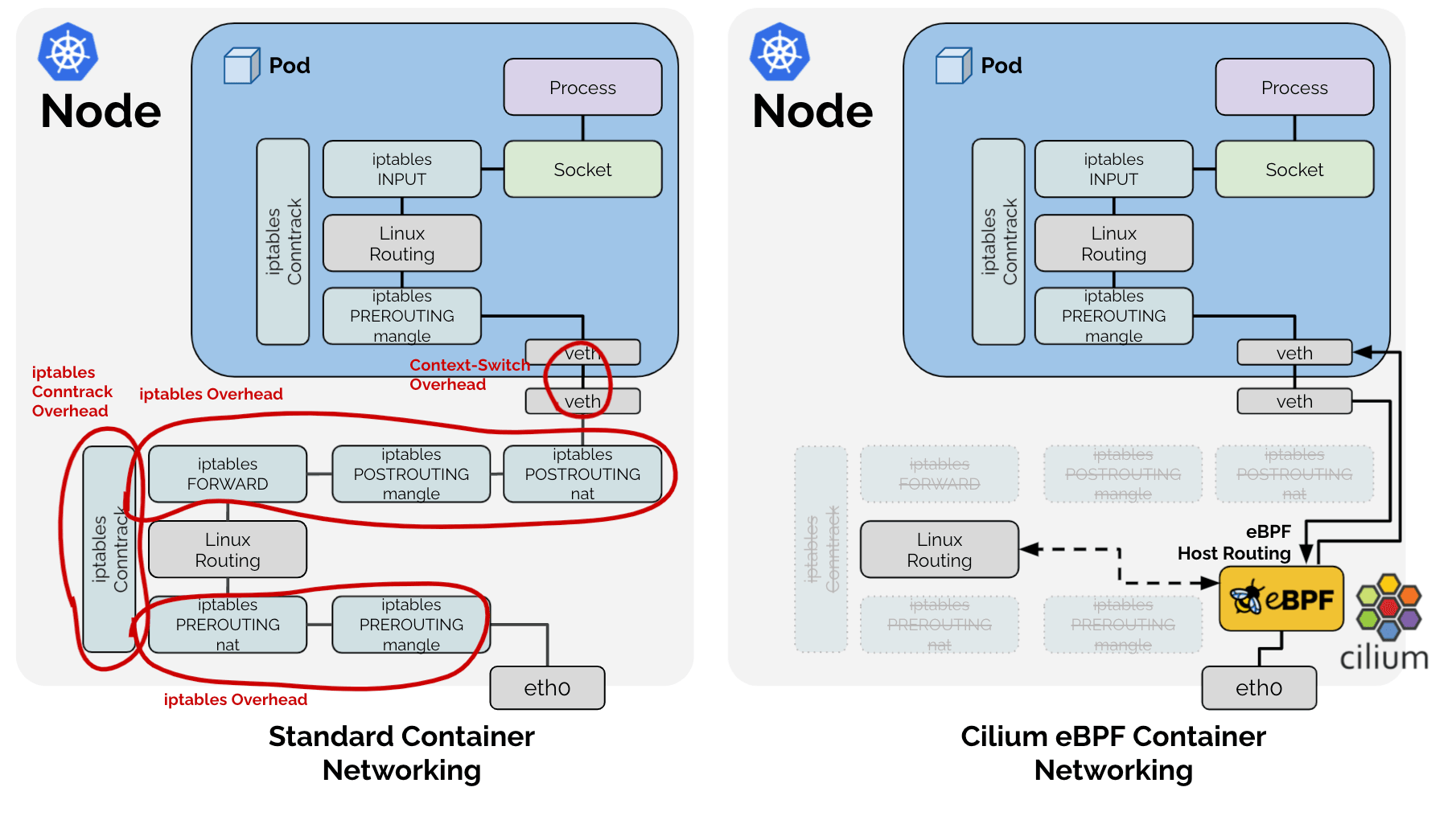
As a result, among the tasks that the existing Linux network stack handled, Cilium adopted the approach of directly implementing only the functions required in the Kubernetes context. Accordingly, for the SNAT process mentioned earlier, Cilium directly manages the SNAT table in the form of an LRU Hash Map (BPF_MAP_TYPE_LRU_HASH).
1# Cilium SNAT table
2# !Example for easy explanation. For the actual definition, see: https://github.com/cilium/cilium/blob/v1.18.0-pre.1/bpf/lib/nat.h#L149-L166
3| src ip     | src port | dst ip  | dst port | protocol, conntrack, and other metadata
4----------------------------------------------
5|            |          |         |          |
Furthermore, since it is a hash table, a key exists for fast lookup, and the combination of src ip, src port, dst ip, and dst port is used as the key.
Problem Recognition
Symptom 1: Lookup
The problem that arises from this is as follows: in order to determine whether a packet passing through eBPF requires SNAT or DNAT processing, the hash table must be looked up. As seen earlier, there are two kinds of packets in the SNAT process: 1. packets going from inside to outside, and 2. the response packets coming from outside back to inside. These two kinds of packets both require NAT translation, yet they have the characteristic that the src IP and port and the dst IP and port values are swapped.
Therefore, for fast lookup, either an additional entry must be added to the hash table with the swapped src and dst values as the key, or every packet, even those unrelated to SNAT, must perform two lookups in the same hash table. Naturally, to achieve better performance, Cilium adopted the approach of inserting the same data twice, under the name RevSNAT.
Symptom 2: LRU
Separately from the above problem, no hardware can have infinite resources, and especially for hardware-level logic requiring high performance where dynamic data structures cannot be used, it becomes necessary to evict existing data when resources run short. Cilium resolves this by using the LRU Hash Map, a basic data structure provided by default in Linux.
Symptom 1 + Symptom 2 = Connection Loss
https://github.com/cilium/cilium/issues/31643
That is, for a single SNAT-ed TCP (or UDP) connection:
- The same data is recorded twice in one hash table, for both outgoing and incoming packets, and
- Depending on the LRU logic, either one of the two entries may be lost at any time,
if even one of the NAT information entries (hereafter "entry") for outgoing or incoming packets is removed by LRU, NAT cannot be performed correctly, which may lead to the loss of the entire connection.
Resolution
Here, the following PRs mentioned earlier come into play.
bpf:nat: restore a NAT entry if its REV NAT is not found
bpf:nat: Restore ORG NAT entry if it's not found
Previously, when a packet passed through eBPF, a key was created from the combination of src ip, src port, dst ip, and dst port in the SNAT table to attempt a lookup. If the key did not exist, a new NAT entry was created according to the SNAT rules and recorded in the table. For a new connection, this would lead to normal communication; however, if the key had been unintentionally removed by LRU, NAT would be performed anew with a port different from the one used by the existing communication, so the receiving side would reject reception, and the connection would be terminated with an RST packet.
The approach taken by the above PR is simple:
Whenever a packet is observed in either direction, let us also refresh the entry for its reverse direction.
When communication is observed in either direction, both entries are refreshed, moving them away from the LRU eviction priority targets, and thereby the likelihood of a scenario in which only one entry is deleted and the entire communication collapses can be reduced.
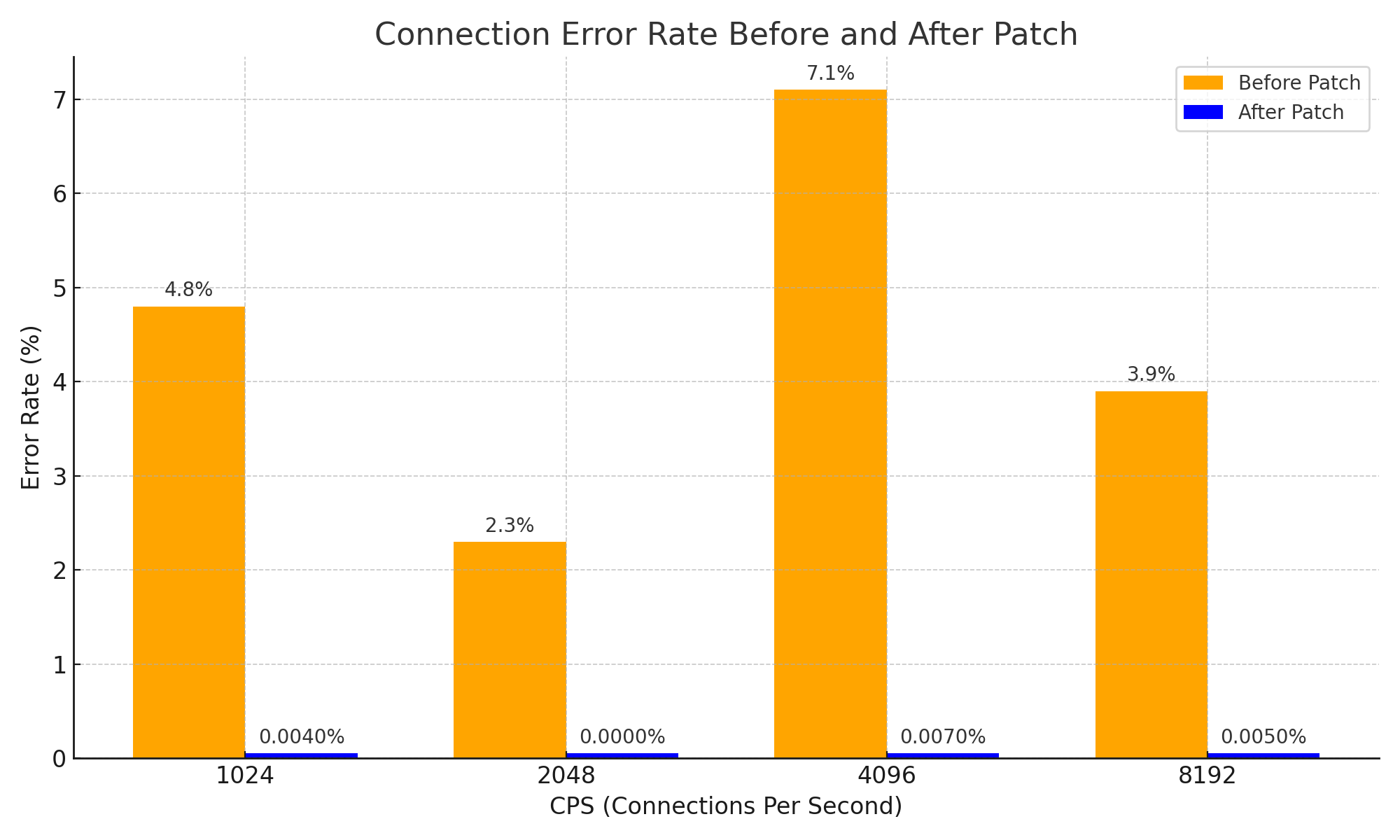
Although this is a very simple approach and may appear to be a straightforward idea, through this approach the problem of the NAT entry for response packets expiring first and the connection being severed was effectively resolved, and system stability was greatly improved. Moreover, it can be said to be a significant improvement that achieved the following results in terms of network stability.
Conclusion
I believe this PR is an excellent example showing how a simple idea can bring about a great change even within a complex system, starting from the basic CS knowledge of how NAT operates.
Ah, of course, I did not directly show examples of complex systems in this article. However, to properly understand this PR, I spent nearly three hours begging DeepSeek V3 0324 while even adding the word Please, and as a result, I gained +1 in knowledge of Cilium and obtained a diagram like the one below. 😇

Also, while reading the issues and PR, I had an ominous feeling that something I had created long ago might have caused the issue, and I am writing this article as a kind of compensation for that sense of unease.
Postscript 1
For reference, this issue has a very effective workaround. Since the root cause of the issue is a shortage of NAT table space, you can simply increase the NAT table size. :-D
When someone encountered the same issue, they would have simply increased the NAT table size without leaving an issue report and run away. Yet gyutaeb, despite not being directly related to the issue, thoroughly analyzed and understood it, contributed to the Cilium ecosystem along with objective evidence data, and I admire and respect that passion.
This was the motivation for deciding to write this article.
Postscript 2
This story is actually not a topic that directly fits Gosuda, which specializes in the Go language. However, Go and the cloud ecosystem are closely related, and Cilium contributors have a certain degree of proficiency in Go, so I brought content that could be posted on a personal blog over to Gosuda.
Since one of the administrators (myself) gave permission, I think it should be fine.
If you think it is not fine, please save it as a PDF soon, as it may be deleted at any time. ;)
Postscript 3
I received great help from Cline and Llama 4 Maverick in writing this article. Although I started the analysis with Gemini and begged DeepSeek, the help I actually received came from Llama 4. Llama 4 is good. Be sure to try it.