Developing an Image Viewer with File List Integration from Go to Tk
In the previous post, we briefly examined the CGo-Free Tcl/Tk library. This time, we will apply the previous example to create an image viewer.
Image Viewer Plan
- The image display from the last session lacked an image deletion feature, causing the window size to be insufficient as more images were loaded. Let us delete unused labels.
- If multiple images are to be listed in the image display, let us create a list.
- It is preferable to load multiple images simultaneously.
- Let us also implement the functionality to remove images that are not to be viewed from the list.
- Let us create a function to select and view a specific image from multiple images.
Modified Tcl/Tk 9.0 Library
The existing library has an inadequate Listbox implementation, making it difficult to display an image list. Let us download the modified library. If Git CLI is not installed, you can download it as a tarball or zip file.
1git clone https://github.com/gg582/tk9.0
First, let us examine some of the added features.
Before examining the new functions, let us briefly understand the structure of the existing functions through the Destroy function on line 1017 of tk.go.
1func Destroy(options ...Opt) {
2	evalErr(fmt.Sprintf("destroy %s", collect(options...)))
3}
This function is implemented by passing an operation in Tcl script format to the evalErr function. This means that to implement a desired feature, one only needs to pass commands in the format of the corresponding Tcl script.
As an example, let us implement a method to add an item to a listbox.
First, for Tcl scripting, let us examine the insert command from the official manual's available listbox commands.
According to the insert command's description page, insert inserts listed items at a specific index.
Therefore, to implement this, one can write code similar to the following:
1func (l *ListboxWidget) AddItem(index int, items string) {
2	evalErr(fmt.Sprintf("%s insert %d %s", l.fpath, index, items))
3}
Now that we understand the approximate implementation principle, let us explain the additional features for Listbox.
List: Insertion/Deletion
 1package main
 2import . "modernc.org/tk9.0"
 3
 4func main() {
 5    length := 3
 6    l := Listbox()
 7    l.AddItem(0, "item1 item2 item3")
 8    b1 := TButton(Txt("Delete Multiple Items, index (0-1)"), Command( func(){
 9        if length >= 2 {
10            l.DeleteItems(0,1)
11            length-=2
12        }
13    }))
14    b2 := TButton(Txt("Delete One Item, index (0)"), Command( func () {
15        if length > 0 {
16            l.DeleteOne(0)
17            length-=1
18        }
19    }))
20    Pack(TExit(),l,b1,b2)
21    App.Wait()
22}
23
In the program above, AddItem sequentially inserts distinct items, separated by spaces, starting from index 0.
"item1 item2 item3" will have indices 0, 1, and 2 respectively.
Run the example to understand how item deletion works.
List: Retrieving Selected Items
Now, let us retrieve and verify the selected items from the Listbox.
 1package main
 2
 3import . "modernc.org/tk9.0"
 4
 5func main() {
 6    l := Listbox()
 7    l.SelectMode("multiple")
 8    l.AddItem(0, "item1 item2 item3")
 9    btn := TButton(Txt("Print Selected"), Command( func() {
10        sel := l.Selected()
11        for _, i := range sel {
12            println(l.GetOne(i))
13        }
14    }))
15
16    Pack(TExit(), l, btn)
17    App.Wait()
18}
The Selected method retrieves the indices of all currently selected items in the Listbox.
The GetOne method retrieves the value of the item corresponding to the given index.
This can be observed from the output printed to the console.
Note that the similar method, Get, accepts a start and end index and retrieves the values of all items within that range.
Next, let us change the color of the listbox.
First, let us examine the example below.
 1package main
 2
 3import . "modernc.org/tk9.0"
 4
 5func main() {
 6    l := Listbox()
 7    l.Background("blue")
 8    l.Foreground("yellow")
 9    l.SelectBackground("black")
10    l.SelectForeground("white")
11    l.Height(20)
12    l.Width(6)
13    l.AddItem(0, "item1 item2 item3")
14    l.ItemForeground(0,"red")
15    l.ItemBackground(0,"green")
16    l.ItemSelectBackground(0,"white")
17    l.ItemSelectForeground(0,"black")
18    l.Relief("ridged")
19    Pack(TExit(),l)
20    App.Wait()
21}
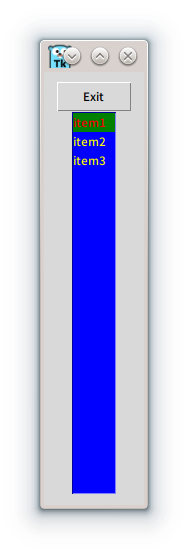
As written in the code above, the height has increased. Also, it can be seen that the colors have been applied correctly. Here, a specific option for different colors for certain items has been set, so it can be observed that only the first line has a different color applied.
Additionally, although there is no significant difference, using the Relief method allows changing the widget border style among flat, groove, raise, ridge, solid, and sunken.
Image Viewer Example
Now, let us create an image viewer using the widgets learned previously. The example program is as follows:
  1package main
  2
  3import (
  4    "fmt"
  5    "log"
  6    "os"
  7    "runtime"
  8    "strings"
  9    "path"
 10
 11    . "modernc.org/tk9.0"
 12)
 13
 14var pbuttons []*TButtonWidget
 15var extensions []FileType
 16var pbutton *TButtonWidget = nil
 17var listbox, listbox2 *ListboxWidget
 18var cur *LabelWidget = nil
 19var imagesLoaded []*LabelWidget
 20func PhotoName(fileName string) string {
 21        fileName = path.Base(fileName)
 22        return fileName[:len(fileName)-len(path.Ext(fileName))]
 23}
 24
 25func handleFileOpen() {
 26    res := GetOpenFile(Multiple(true),Filetypes(extensions)) // Activates multi-selection and turns on the filter.
 27    s := make([]string,0,1000)
 28    for _, itm := range res {
 29        if itm != "" {
 30            tmp := strings.Split(itm," ")
 31            s = append(s,tmp...)
 32        }
 33    }
 34
 35    for _, photo := range s {
 36        formatCheck := strings.Split(photo, ".")
 37        format := formatCheck[len(formatCheck)-1]
 38
 39        if (strings.Compare(format, "png") == 0) || (strings.Compare(format, "ico") == 0) {
 40            picFile, err := os.Open(photo)
 41            if err != nil {
 42                log.Println("Error while opening photo, error is: ", err)
 43            }
 44
 45            pictureRawData := make([]byte, 10000*10000)
 46            picFile.Read(pictureRawData)
 47
 48            imageLabel := Label(Image(NewPhoto(Data(pictureRawData))))
 49                        imagesLoaded = append(imagesLoaded,imageLabel)
 50            var deleteTestButton *TButtonWidget
 51            deleteTestButton = TButton(
 52                Txt("Unshow Image"),
 53            Command(func() {
 54                GridForget(imageLabel.Window)
 55                GridForget(deleteTestButton.Window)
 56            }))
 57
 58            pbuttons = append(pbuttons,deleteTestButton)
 59
 60                        listbox.AddItem(len(imagesLoaded)-1,PhotoName(photo))
 61                        listbox2.AddItem(len(imagesLoaded)-1,PhotoName(photo))
 62            picFile.Close()
 63        }
 64    }
 65}
 66
 67func DeleteSelected () {
 68    s:=listbox.Selected()
 69    if len(s) == 0 {
 70        return
 71        }
 72    for _, i := range s {
 73        listbox.DeleteOne(i)
 74        listbox2.DeleteOne(i)
 75        if len(imagesLoaded)-1>i {
 76            continue
 77        }
 78        if cur == imagesLoaded[i] {
 79            pbutton = nil
 80            cur = nil
 81        }
 82        Destroy(imagesLoaded[i])
 83        Destroy(pbuttons[i])
 84                imagesLoaded = append(imagesLoaded[:i],imagesLoaded[i+1:]...)
 85        pbuttons = append(pbuttons[:i], pbuttons[i+1:]...)
 86    }
 87}
 88
 89func SelectImage() {
 90        s:=listbox2.Selected()
 91        if len(s) == 0 {
 92                return
 93        }
 94
 95    if len(imagesLoaded) -1 < s[0] {
 96        return
 97    }
 98    if imagesLoaded[s[0]] == nil {
 99        return
100    }
101    if cur != nil {
102            GridForget(cur.Window)
103    }
104    if pbutton != nil {
105        GridForget(pbutton.Window)
106    }
107
108        Grid(imagesLoaded[s[0]], Row(0), Column(2))
109    Grid(pbuttons[s[0]], Row(0), Column(3))
110    cur = imagesLoaded[s[0]]
111    pbutton = pbuttons[s[0]]
112}
113
114func SelectIndex(index int) {
115
116    if len(imagesLoaded) -1 <index {
117        return
118    }
119    if imagesLoaded[index] == nil {
120        return
121    }
122    if cur != nil {
123            GridForget(cur.Window)
124    }
125    if pbutton != nil {
126        GridForget(pbutton.Window)
127    }
128
129        Grid(imagesLoaded[index], Row(0), Column(2))
130    Grid(pbuttons[index], Row(0), Column(3))
131    cur = imagesLoaded[index]
132    pbutton = pbuttons[index]
133}
134
135func main() {
136    menubar := Menu()
137    //DefaultTheme("awdark","themes/awthemes-10.4.0")
138    // Specify the theme name and path if you wish to use a theme.
139    fileMenu := menubar.Menu()
140    extensions = make([]FileType,0,1)
141    extensions = append(extensions, FileType{ "Supported Images", []string {".png",".ico"}, "" } )
142    // Add png and ico to the filter.
143    fileMenu.AddCommand(Lbl("Open..."), Underline(0), Accelerator("Ctrl+O"), Command(func () {
144        handleFileOpen()
145        SelectIndex(len(imagesLoaded)-1)
146    } ))
147    Bind(App, "<Control-o>", Command(func() { fileMenu.Invoke(0) }))
148    fileMenu.AddCommand(Lbl("Exit"), Underline(1), Accelerator("Ctrl+Q"), ExitHandler())
149    Bind(App, "<Control-q>", Command(func() { fileMenu.Invoke(1) }))
150    menubar.AddCascade(Lbl("File"), Underline(0), Mnu(fileMenu))
151        imagesLoaded = make([]*LabelWidget, 0, 10000)
152    pbuttons = make([]*TButtonWidget,0,10000)
153    var scrollx, scroll, scroll2, scrollx2 *TScrollbarWidget
154        listbox = Listbox(Yscrollcommand(func(e *Event) { e.ScrollSet(scroll)}) , Xscrollcommand( func(e *Event) { e.ScrollSet(scrollx)}))
155        listbox2 = Listbox(Yscrollcommand(func(e *Event) { e.ScrollSet(scroll2)}), Xscrollcommand(func(e *Event) { e.ScrollSet(scrollx2)}))
156        listbox.SelectMode("multiple")
157        listbox2 = Listbox()
158        listbox.Background("white")
159        listbox.SelectBackground("blue")
160        listbox.SelectForeground("yellow")
161        listbox2.Background("grey")
162        listbox2.SelectBackground("green")
163    listbox2.SelectForeground("blue")
164    listbox2.SelectBackground("brown")
165        listbox.Height(5)
166        listbox.Width(4)
167        listbox2.Height(5)
168        listbox2.Width(4)
169        delBtn := Button(Txt("Delete"), Command(func () { DeleteSelected() }))
170        selBtn := Button(Txt("Select"), Command(func () { SelectImage() }))
171        scroll = TScrollbar(Command(func(e *Event) { e.Yview(listbox) }))
172        scrollx = TScrollbar(Orient("horizontal"),Command(func(e *Event) { e.Xview(listbox) }))
173    scroll2 = TScrollbar(Command(func(e *Event) { e.Yview(listbox2) }))
174        scrollx2 = TScrollbar(Orient("horizontal"),Command(func(e *Event) { e.Xview(listbox2) }))
175        Grid(listbox,Row(1),Column(0), Sticky("nes"))
176        Grid(scroll,Row(1),Column(1), Sticky("nes"))
177    Grid(scrollx,Row(2),Column(0),  Sticky("nes"))
178        Grid(delBtn,Row(3),Column(0), Sticky("nes"))
179        Grid(listbox2,Row(1),Column(2), Sticky("nes"))
180        Grid(scroll2,Row(1),Column(3), Sticky("nes"))
181    Grid(scrollx2,Row(2),Column(2), Sticky("nes"))
182        Grid(selBtn,Row(3),Column(2), Sticky("nes"))
183    App.WmTitle(fmt.Sprintf("%s on %s", App.WmTitle(""), runtime.GOOS))
184    App.Configure(Mnu(menubar), Width("80c"), Height("60c")).Wait()
185}
186
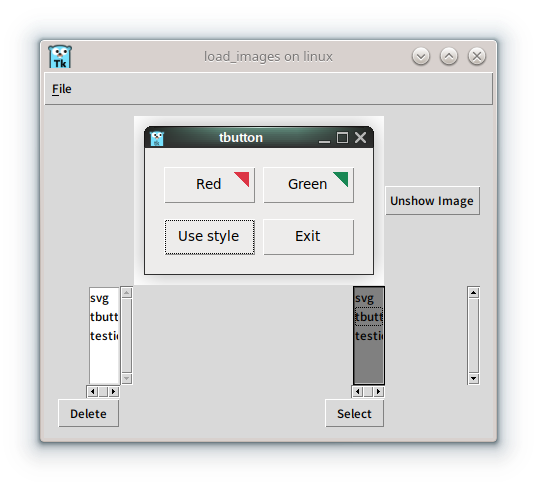
In this example, to simplify the implementation, all image widgets are created in advance when loaded, and duplicate files are not checked.
One can improve the issues mentioned earlier, or try changing the theme using the commented-out DefaultTheme method.
We encourage you to practice by creating a new program that addresses these improvements.
Summary
In this article, we explored how command calls in the Go language's Tcl/Tk library operate and created an image viewer with an added listbox.
- Tcl/Tk library command invocation method
- How to use the listbox
- Modifying listbox widget properties
- Creating an image viewer
In this manner, we encourage you to attempt modifications to other libraries and create complete programs with the added functionalities.