Enhancing Responsiveness with Redis Client-Side Caching
What is Redis?
It is unlikely that many are unfamiliar with Redis. However, if we were to briefly describe it with a few key characteristics, it could be summarized as follows:
- Operations are performed in a single thread, ensuring that all operations possess atomicity.
- Data is stored and processed in-memory, making all operations fast.
- Redis can store a WAL (Write-Ahead Log) depending on the option, allowing for rapid backup and recovery of the latest state.
- It supports various data types such as Set, Hash, Bit, and List, leading to high productivity.
- It boasts a large community, facilitating the sharing of diverse experiences, issues, and solutions.
- Having undergone extensive development and operation, it offers reliable stability.
Moving to the Main Topic
Imagine This?
What if your service's cache met the following two conditions?
- When frequently accessed data must be provided to the user in its latest state, but updates are irregular, necessitating frequent cache invalidation.
- When updates are not required, but the same cached data is frequently accessed and queried.
The first case can be illustrated by real-time popular product rankings in an online shopping mall. If real-time popular product rankings are stored as a sorted set, it would be inefficient for the user to read from Redis every time they access the main page. For the second case, consider exchange rate data: even if exchange rates are updated approximately every 10 minutes, actual queries occur very frequently. Specifically, queries for KRW-USD, KRW-JPY, and KRW-CNY exchange rates access the cache with high frequency. In such cases, it would be more efficient for the API server to maintain a separate local cache and, upon data changes, query Redis again to update it.
So, how can such an operation be implemented within a database - Redis - API server architecture?
Can't Redis PubSub Handle It?
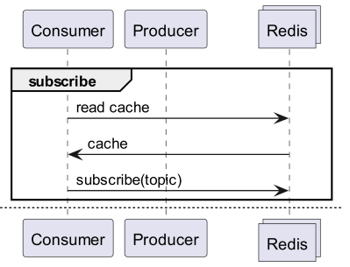
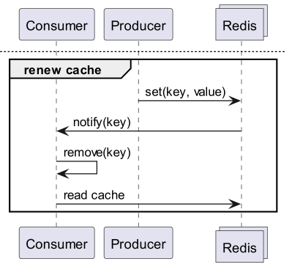
When using a cache, subscribe to a channel that provides update notifications!
- This would necessitate creating logic to send messages upon updates.
- The additional operations caused by PubSub would impact performance.
What if Redis Detects Changes?
What if we use Keyspace Notifications to receive command notifications for specific keys?
- There is the inconvenience of having to pre-store and share the keys and commands used for updates.
- For example, it becomes complex if for some keys a simple Set is the update command, while for others it is LPush, RPush, SAdd, or SRem.
- This significantly increases the likelihood of communication mismatches and human errors in coding during the development process.
What if we use Keyevent Notifications to receive notifications on a command-by-command basis?
- It requires subscribing to all commands used for updates. Appropriate filtering of incoming keys would then be necessary.
- For instance, for some keys received via
DEL, the client might not have a local cache. - This could lead to unnecessary resource consumption.
Hence the Need for Invalidation Messages!
What are Invalidation Messages?
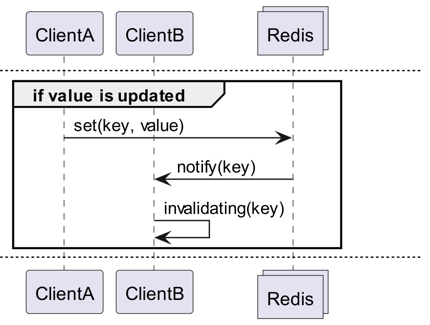
Invalidation Messages are a concept introduced with Redis 6.0 as part of Server Assisted Client-Side Cache. Invalidation Messages are delivered in the following flow:
- Assume ClientB has already read a key once.
- ClientA sets a new value for that key.
- Redis detects the change and publishes an Invalidation Message to ClientB, instructing ClientB to clear its cache.
- ClientB receives the message and takes appropriate action.
How to Use It
Basic Operational Structure
A client connected to Redis enables receiving invalidation messages by executing CLIENT TRACKING ON REDIRECT <client-id>. The client that needs to receive messages then subscribes to __redis__:invalidate to receive invalidation messages.
Default Tracking
1# client 1
2> SET a 100
1# client 3
2> CLIENT ID
312
4> SUBSCRIBE __redis__:invalidate
51) "subscribe"
62) "__redis__:invalidate"
73) (integer) 1
1# client 2
2> CLIENT TRACKING ON REDIRECT 12
3> GET a # tracking
1# client 1
2> SET a 200
1# client 3
21) "message"
32) "__redis__:invalidate"
43) 1) "a"
Broadcasting Tracking
1# client 3
2> CLIENT ID
312
4> SUBSCRIBE __redis__:invalidate
51) "subscribe"
62) "__redis__:invalidate"
73) (integer) 1
1# client 2
2CLIENT TRACKING ON BCAST PREFIX cache: REDIRECT 12
1# client 1
2> SET cache:name "Alice"
3> SET cache:age 26
1# client 3
21) "message"
32) "__redis__:invalidate"
43) 1) "cache:name"
51) "message"
62) "__redis__:invalidate"
73) 1) "cache:age"
Implementation! Implementation! Implementation!
Redigo + Ristretto
Explaining it solely in this manner might make it ambiguous how to use it in actual code. Therefore, let's first set it up simply with redigo and ristretto.
First, install the two dependencies.
github.com/gomodule/redigogithub.com/dgraph-io/ristretto
 1package main
 2
 3import (
 4	"context"
 5	"fmt"
 6	"log/slog"
 7	"time"
 8
 9	"github.com/dgraph-io/ristretto"
10	"github.com/gomodule/redigo/redis"
11)
12
13type RedisClient struct {
14	conn  redis.Conn
15	cache *ristretto.Cache[string, any]
16	addr  string
17}
18
19func NewRedisClient(addr string) (*RedisClient, error) {
20	cache, err := ristretto.NewCache(&ristretto.Config[string, any]{
21		NumCounters: 1e7,     // number of keys to track frequency of (10M).
22		MaxCost:     1 << 30, // maximum cost of cache (1GB).
23		BufferItems: 64,      // number of keys per Get buffer.
24	})
25	if err != nil {
26		return nil, fmt.Errorf("failed to generate cache: %w", err)
27	}
28
29	conn, err := redis.Dial("tcp", addr)
30	if err != nil {
31		return nil, fmt.Errorf("failed to connect to redis: %w", err)
32	}
33
34	return &RedisClient{
35		conn:  conn,
36		cache: cache,
37		addr:  addr,
38	}, nil
39}
40
41func (r *RedisClient) Close() error {
42	err := r.conn.Close()
43	if err != nil {
44		return fmt.Errorf("failed to close redis connection: %w", err)
45	}
46
47	return nil
48}
First, a RedisClient is created simply, incorporating ristretto and redigo.
 1func (r *RedisClient) Tracking(ctx context.Context) error {
 2	psc, err := redis.Dial("tcp", r.addr)
 3	if err != nil {
 4		return fmt.Errorf("failed to connect to redis: %w", err)
 5	}
 6
 7	clientId, err := redis.Int64(psc.Do("CLIENT", "ID"))
 8	if err != nil {
 9		return fmt.Errorf("failed to get client id: %w", err)
10	}
11	slog.Info("client id", "id", clientId)
12
13	subscriptionResult, err := redis.String(r.conn.Do("CLIENT", "TRACKING", "ON", "REDIRECT", clientId))
14	if err != nil {
15		return fmt.Errorf("failed to enable tracking: %w", err)
16	}
17	slog.Info("subscription result", "result", subscriptionResult)
18
19	if err := psc.Send("SUBSCRIBE", "__redis__:invalidate"); err != nil {
20		return fmt.Errorf("failed to subscribe: %w", err)
21	}
22	psc.Flush()
23
24	for {
25		msg, err := psc.Receive()
26		if err != nil {
27			return fmt.Errorf("failed to receive message: %w", err)
28		}
29
30		switch msg := msg.(type) {
31		case redis.Message:
32			slog.Info("received message", "channel", msg.Channel, "data", msg.Data)
33			key := string(msg.Data)
34			r.cache.Del(key)
35		case redis.Subscription:
36			slog.Info("subscription", "kind", msg.Kind, "channel", msg.Channel, "count", msg.Count)
37		case error:
38			return fmt.Errorf("error: %w", msg)
39		case []interface{}:
40			if len(msg) != 3 || string(msg[0].([]byte)) != "message" || string(msg[1].([]byte)) != "__redis__:invalidate" {
41				slog.Warn("unexpected message", "message", msg)
42				continue
43			}
44
45			contents := msg[2].([]interface{})
46			keys := make([]string, len(contents))
47			for i, key := range contents {
48				keys[i] = string(key.([]byte))
49				r.cache.Del(keys[i])
50			}
51			slog.Info("received invalidation message", "keys", keys)
52		default:
53			slog.Warn("unexpected message", "type", fmt.Sprintf("%T", msg))
54		}
55	}
56}
The code is somewhat complex.
- To enable Tracking, an additional connection is established. This measure is taken to prevent PubSub from interfering with other operations.
- The ID of the additional connection is queried, and the connection that will query data is redirected to track that specific connection.
- Subsequently, the invalidation message is subscribed to.
- The code handling the subscription is somewhat intricate. Since redigo does not parse invalidation messages, it is necessary to receive and process the raw response before parsing.
 1func (r *RedisClient) Get(key string) (any, error) {
 2	val, found := r.cache.Get(key)
 3	if found {
 4		switch v := val.(type) {
 5		case int64:
 6			slog.Info("cache hit", "key", key)
 7			return v, nil
 8		default:
 9			slog.Warn("unexpected type", "type", fmt.Sprintf("%T", v))
10		}
11	}
12	slog.Info("cache miss", "key", key)
13
14	val, err := redis.Int64(r.conn.Do("GET", key))
15	if err != nil {
16		return nil, fmt.Errorf("failed to get key: %w", err)
17	}
18
19	r.cache.SetWithTTL(key, val, 1, 10*time.Second)
20	return val, nil
21}
The Get method first queries Ristretto, and if the data is not found, it retrieves it from Redis.
 1package main
 2
 3import (
 4	"context"
 5	"log/slog"
 6	"os"
 7	"os/signal"
 8	"time"
 9)
10
11func main() {
12	ctx, cancel := signal.NotifyContext(context.Background(), os.Interrupt)
13	defer cancel()
14
15	client, err := NewRedisClient("localhost:6379")
16	if err != nil {
17		panic(err)
18	}
19	defer client.Close()
20
21	go func() {
22		if err := client.Tracking(ctx); err != nil {
23			slog.Error("failed to track invalidation message", "error", err)
24		}
25	}()
26
27	ticker := time.NewTicker(1 * time.Second)
28	defer ticker.Stop()
29	done := ctx.Done()
30
31	for {
32		select {
33		case <-done:
34			slog.Info("shutting down")
35			return
36		case <-ticker.C:
37			v, err := client.Get("key")
38			if err != nil {
39				slog.Error("failed to get key", "error", err)
40				return
41			}
42			slog.Info("got key", "value", v)
43		}
44	}
45}
The code for testing is as presented above. If you test it, you will observe that the value is updated whenever data in Redis is refreshed.
However, this is overly complex. Moreover, to scale it for a cluster, it is inherently necessary to enable Tracking for all masters or replicas.
Rueidis
For those using the Go language, we have rueidis, which is the most modern and advanced option. Let's write code that utilizes server-assisted client-side caching in a Redis cluster environment using rueidis.
First, install the dependency.
github.com/redis/rueidis
Then, write the code to query data from Redis.
 1package main
 2
 3import (
 4	"context"
 5	"log/slog"
 6	"os"
 7	"os/signal"
 8	"time"
 9
10	"github.com/redis/rueidis"
11)
12
13func main() {
14	ctx, cancel := signal.NotifyContext(context.Background(), os.Interrupt)
15	defer cancel()
16
17	client, err := rueidis.NewClient(rueidis.ClientOption{
18		InitAddress: []string{"localhost:6379"},
19	})
20	if err != nil {
21		panic(err)
22	}
23
24	ticker := time.NewTicker(1 * time.Second)
25	defer ticker.Stop()
26	done := ctx.Done()
27
28	for {
29		select {
30		case <-done:
31			slog.Info("shutting down")
32			return
33		case <-ticker.C:
34			const key = "key"
35			resp := client.DoCache(ctx, client.B().Get().Key(key).Cache(), 10*time.Second)
36			if resp.Error() != nil {
37				slog.Error("failed to get key", "error", resp.Error())
38				continue
39			}
40			i, err := resp.AsInt64()
41			if err != nil {
42				slog.Error("failed to convert response to int64", "error", err)
43				continue
44			}
45			switch resp.IsCacheHit() {
46			case true:
47				slog.Info("cache hit", "key", key)
48			case false:
49				slog.Info("missed key", "key", key)
50			}
51			slog.Info("got key", "value", i)
52		}
53	}
54}
With rueidis, to use client-side cache, one simply needs to call DoCache. This will add data to the local cache, specifying how long it should be maintained. Subsequently, calling DoCache again will retrieve data from the local cache. Naturally, invalidation messages are also handled correctly.
Why not redis-go?
Unfortunately, redis-go does not officially support server-assisted client-side cache through its API. Furthermore, when creating PubSub, it establishes a new connection, and there is no direct API to access that specific connection, making it impossible to ascertain the client ID. Consequently, redis-go was deemed structurally incompatible and thus omitted.
How Alluring
Through the Client-Side Cache Structure
- If data can be prepared in advance, this structure can minimize Redis queries and traffic while consistently providing the most current data.
- This enables the creation of a CQRS-like structure, significantly enhancing read performance.

How Much More Alluring Has It Become?
In practice, since such a structure is currently in use, I conducted a brief latency comparison for two APIs. Please understand that I can only provide abstract details.
- First API
- Initial query: average 14.63ms
- Subsequent queries: average 2.82ms
- Average difference: 10.98ms
- Second API
- Initial query: average 14.05ms
- Subsequent queries: average 1.60ms
- Average difference: 11.57ms
There was an additional latency improvement of up to approximately 82%!
The following improvements are anticipated:
- Elimination of network communication between the client and Redis, and traffic savings.
- Reduction in the number of read commands Redis itself must execute.
- This also has the effect of improving write performance.
- Minimization of Redis protocol parsing.
- Parsing the Redis protocol is not without cost. Reducing this is a significant opportunity.
However, everything involves trade-offs. For this, we have sacrificed at least the following two aspects:
- The necessity of implementing, operating, and maintaining client-side cache management components.
- Increased CPU and memory usage on the client due to this.
Conclusion
Personally, this architectural component proved satisfactory, resulting in minimal latency and stress on the API server. I intend to configure architectures with such a structure whenever feasible in the future.