 GoSuda
Fast Isolated Docker Environments for AI Agent RL Rollouts with gvx

The Security and Infrastructure Bottleneck in Coding Agent RL Rollouts
Training and evaluating software engineering agents across benchmarks and reinforcement learning (RL) frameworks such as SWE-bench, SWE-ReX, R2E-Gym, SWE-Gym, Verl, and OpenHands requires executing thousands of concurrent rollouts of untrusted, LLM-generated code. In real-world software engineering tasks, an agent does not merely edit text files: it runs docker build, spins up databases and microservices via docker compose, executes integration test suites, and inspects container logs.
At rollout scale (128 to 1,024 concurrent episodes per cluster), existing container infrastructure hits four systemic security and performance bottlenecks:
- Host
dockerdLock Contention and State Leakage: Pointing hundreds of concurrent RL workers at a single host/var/run/docker.sockgives every agent root-equivalent access to the host daemon, serializes image layer extraction, exhaustsdocker0subnet allocations, triggersAnother app is currently holding the xtables lockerrors in hostiptables, and leaks orphan containers across episodes. - Privileged DinD Container Escape Risk: Running standard
docker:dindcontainers requires--privileged(CAP_SYS_ADMIN), which exposes raw host block devices, cgroup release agents, and kernel modules to untrusted RL rollouts. - Hardware Virtualization (
/dev/kvm) Constraints: MicroVM runtimes (Firecracker,QEMU,Kata Containers) isolate inner kernels cleanly, but they require/dev/kvm. Standard Kubernetes pods without nested virtualization, bare-metal cloud instances where KVM is disabled, and existinggVisor(runsc) sandboxes cannot launch KVM microVMs. - Slow Episode Reset (
env.reset()) Latency: Starting a freshdocker:dindenvironment and pulling or unpacking base images for every RL episode takes 10 to 60 seconds, leaving GPU training workers idle while waiting for environment resets.
gvx (rungv CLI and z.gfire.dev/gvx/pkg/gvx Go SDK) provides a secure, defense-in-depth rollout runtime that resolves all four bottlenecks. Each rollout environment runs as a single unprivileged, self-locked user-space process (isolated by Google's gVisor Sentry kernel, pkg/hostlockdown, and an in-memory netstack) whose entire /var/lib/docker state resides inside a single copy-on-write .ext4 file (ext4lite).
Zero-Privilege Security for Untrusted Agent Rollouts: Every
gvxepisode locks down its own host OS process before running guest code (PR_SET_NO_NEW_PRIVS+ BPFseccompon Linux, Seatbeltdeny defaulton macOS, Restricted Token + Job Object on Windows). Even if an RL agent executesdocker run --privilegedor destructiverm -rf /commands inside its episode, those operations remain strictly confined to that episode's user-spaceSentrykernel and ephemeral.ext4volume file.
Rollout Architecture: Parallel Unprivileged Instances + Reflink Snapshots
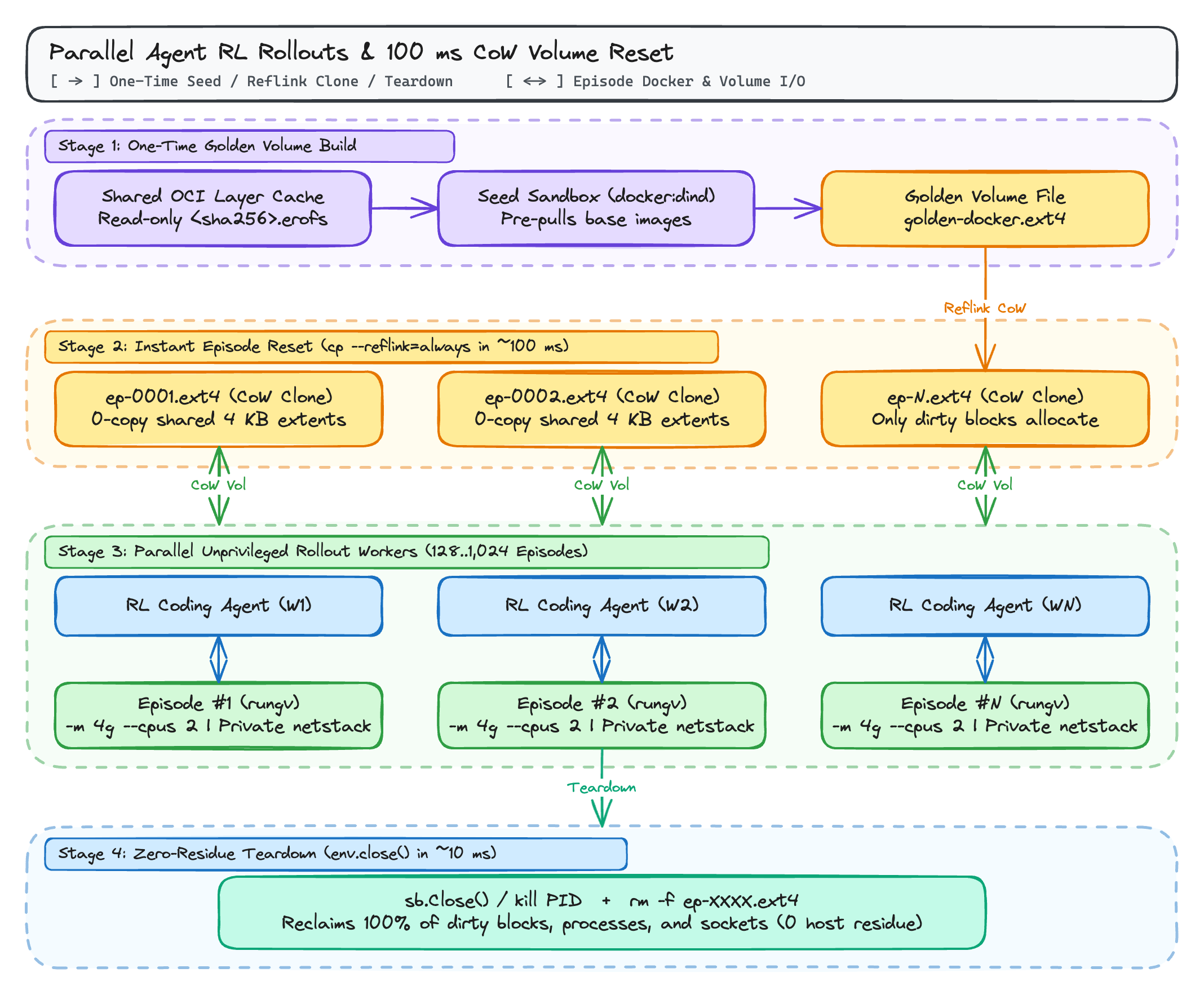
In gvx, every rollout worker is an ordinary unprivileged OS process with its own gVisor Sentry kernel, its own user-space netstack (10.0.2.15/24), and its own ext4lite block volume (ep-N.ext4), while sharing a read-only content-addressable erofs OCI image cache across the host page cache.
Why Single-File ext4lite Volumes Change RL Reset Economics
Because gvx's ext4lite filesystem stores an entire JBD2-journaled ext4 volume (including Docker's overlayfs layer directories, trusted.overlay.* extended attributes, whiteout device nodes, and image metadata) inside one regular host file, episode lifecycle management becomes a single file operation:
- 100-Millisecond
env.reset()viacp --reflink=always:- You build a
golden-docker.ext4file once containing pre-pulled base images (python:3.11,postgres:16,redis:7, or task-specificSWE-benchbase images). - At the start of each RL episode,
cp --reflink=always golden-docker.ext4 ep-0042.ext4(on XFS, Btrfs, ZFS, or macOS APFS) creates an independent Copy-on-Write clone in under 100 milliseconds without copying underlying disk blocks. - Only the 4 KiB blocks dirtied during that specific episode consume additional disk space.
- You build a
- Zero-Residue Teardown (
env.close()):- Terminating the
rungvprocess (sb.Close()in Go) and unlinkingep-0042.ext4reclaims 100% of the episode's processes, network sockets, mounts, and storage in ~10 milliseconds. Nothing is ever mounted in the host kernel's mount table or registered in host cgroups.
- Terminating the
Step-by-Step Workflow: Golden .ext4 Snapshot and Fast Episode Reset
You can install rungv on each rollout worker node either by downloading the SLSA-attested prebuilt binary from GitHub Releases (gh attestation verify rungv-v0.2.0-linux-amd64.tar.gz --repo gfire-sigs/gvx --signer-workflow gfire-sigs/gvx/.github/workflows/release.yml --deny-self-hosted-runners) or by running CGO_ENABLED=0 go install z.gfire.dev/gvx/cmd/rungv@latest.
Step 1: Create the Golden docker:dind Volume Once
 1mkdir -p /srv/rl-snapshots /srv/rl-episodes
 2
 3# 1. Start a seed docker:dind instance backed by golden-docker.ext4
 4rungv run \
 5  -p unix:/srv/rl-snapshots/seed.sock:2375 \
 6  --mount type=volume,src=/srv/rl-snapshots/golden-docker.ext4,dst=/var/lib/docker \
 7  -e DOCKER_TLS_CERTDIR= \
 8  docker:dind --tls=false &
 9SEED_PID=$!
10
11# 2. Pre-populate base images and build cache inside golden-docker.ext4
12export DOCKER_HOST="unix:///srv/rl-snapshots/seed.sock"
13until docker info >/dev/null 2>&1; do sleep 0.5; done
14
15docker pull python:3.11-slim
16docker pull redis:7-alpine
17docker pull postgres:16-alpine
18
19# 3. Gracefully stop the seed instance so ext4lite flushes and compacts the image
20kill -INT $SEED_PID
21wait $SEED_PID
Step 2: Spawn Parallel RL Episodes in 100 Milliseconds
Each parallel rollout worker clones golden-docker.ext4 via reflink and boots an isolated docker:dind instance with all images already present in /var/lib/docker:
 1EPISODE_ID="ep-0042"
 2SOCK="/srv/rl-episodes/${EPISODE_ID}.sock"
 3
 4# Instant Copy-on-Write clone (~100 ms on XFS/Btrfs/APFS)
 5cp --reflink=always \
 6  /srv/rl-snapshots/golden-docker.ext4 \
 7  "/srv/rl-episodes/${EPISODE_ID}.ext4"
 8
 9# Launch isolated unprivileged episode with 4 GiB RAM and 2 CPUs
10rungv run \
11  -m 4g --cpus 2 \
12  -p "unix:${SOCK}:2375" \
13  --mount "type=volume,src=/srv/rl-episodes/${EPISODE_ID}.ext4,dst=/var/lib/docker" \
14  -e DOCKER_TLS_CERTDIR= \
15  docker:dind --tls=false &
16EP_PID=$!
17
18export DOCKER_HOST="unix://${SOCK}"
19until docker info >/dev/null 2>&1; do sleep 0.2; done
20
21# Inside the rollout worker, images are immediately available without network pull
22docker images
23
24# Episode teardown after reward calculation (~10 ms)
25kill -KILL $EP_PID
26rm -f "/srv/rl-episodes/${EPISODE_ID}.ext4" "${SOCK}"
Programmatic Rollout Pool Using the z.gfire.dev/gvx/pkg/gvx Go SDK
If your RL environment server or evaluation harness is written in Go (or calls a Go rollout daemon over gRPC), you can manage parallel container episodes directly through z.gfire.dev/gvx/pkg/gvx:
 1package main
 2
 3import (
 4	"bytes"
 5	"context"
 6	"fmt"
 7	"log"
 8	"os"
 9	"os/exec"
10	"path/filepath"
11	"time"
12
13	"z.gfire.dev/gvx/pkg/gvx"
14)
15
16func runEpisode(ctx context.Context, goldenExt4, scratchDir string, epID int) error {
17	epExt4 := filepath.Join(scratchDir, fmt.Sprintf("ep-%04d.ext4", epID))
18	defer os.Remove(epExt4)
19
20	// 1. Reflink clone the golden ext4lite volume
21	cpCmd := exec.CommandContext(ctx, "cp", "--reflink=always", goldenExt4, epExt4)
22	if err := cpCmd.Run(); err != nil {
23		return fmt.Errorf("clone golden volume: %w", err)
24	}
25
26	// 2. Apply per-episode wall-clock timeout
27	epCtx, cancel := context.WithTimeout(ctx, 2*time.Minute)
28	defer cancel()
29
30	var stdout, stderr bytes.Buffer
31	sb, err := gvx.New(epCtx, gvx.Config{
32		Platform:               gvx.PlatformAuto,
33		NetworkMode:            gvx.NetModeNAT,
34		NetRaw:                 true,
35		AllowPacketSocketWrite: true,
36		AllowSUID:              true,
37		OCIImage:               "docker:dind",
38		Entrypoint:             []string{"sh", "-c"},
39		EntrypointSet:          true,
40		Cmd: []string{
41			"dockerd-entrypoint.sh --tls=false >/var/log/dockerd.log 2>&1 & " +
42				"until docker info >/dev/null 2>&1; do sleep 0.2; done && " +
43				"docker run --rm python:3.11-slim python -c 'print(6 * 7)'",
44		},
45		Envv: []string{"DOCKER_TLS_CERTDIR="},
46		Mounts: []gvx.Mount{
47			{
48				Kind:      gvx.MountVolume,
49				ImagePath: epExt4,
50				GuestPath: "/var/lib/docker",
51			},
52		},
53		Resources: gvx.Resources{
54			MemoryBytes: 4 << 30, // 4 GiB cap
55			CPUMillis:   2000,    // 2.0 CPUs
56		},
57		Stdout: &stdout,
58		Stderr: &stderr,
59	})
60	if err != nil {
61		return fmt.Errorf("init episode %d: %w", epID, err)
62	}
63	defer sb.Close()
64
65	exitCode, err := sb.Run(epCtx)
66	if err != nil {
67		return fmt.Errorf("run episode %d: %w", epID, err)
68	}
69
70	log.Printf("episode %d finished: exit=%d stdout=%q", epID, exitCode, stdout.String())
71	return nil
72}
73
74func main() {
75	ctx := context.Background()
76	if err := runEpisode(ctx, "/srv/rl-snapshots/golden-docker.ext4", "/srv/rl-episodes", 1); err != nil {
77		log.Fatal(err)
78	}
79}
Comparison of Agent RL Sandbox Runtimes
| Metric / Requirement | Shared Host dockerd | Privileged docker:dind | Firecracker / KVM MicroVM | Standard gVisor (runsc) | gvx (rungv / pkg/gvx) |
|---|---|---|---|---|---|
Host root or --privileged required | Yes (docker.sock = root) | Yes (--privileged) | Needs /dev/kvm + TAP setup | Yes (or userns + mount) | No (single unprivileged process) |
Works inside unprivileged K8s Pods / existing runsc | No | No | No (no /dev/kvm) | Fails (EBUSY on nested seccomp) | Yes (automatic futex loop fallback) |
Supports inner docker build & docker compose | Shares host daemon | Yes | Yes | Fails without host DinD tuning | Yes (overlayfs on ext4lite) |
| Per-episode network isolation | Shared docker0 / xtables lock | Separate namespace | Separate VM NIC | Separate netns | Isolated in-process netstack |
Warm episode reset latency (env.reset()) | 5s to 30s (container/vol prune) | 10s to 60s (cold daemon) | ~150 ms (VM snapshot) | 5s to 20s | ~100 ms (cp --reflink=always .ext4) |
| Cross-platform local dev (Windows / macOS / Linux) | Requires Linux VM | Requires Linux VM | Linux KVM only | Linux only | Native on Windows, macOS, and Linux |
Further Reading in This Series
- gvx: Running Linux Containers, Docker, and Kubernetes in One Unprivileged Process: Complete architectural walkthrough of
gvxacross Windows (whpx,systrap), macOS (hvf), and Linux (systrap). - Running Docker, docker build, and docker compose Without Root or User Namespaces: Quick 3-step bootstrap and troubleshooting guide when
sudo,unshare(CLONE_NEWUSER),mount(2), and/dev/fuseare blocked. - Running Docker-in-Docker Inside gVisor and Nested Sandboxes with gvx: Deep dive into why
docker.ioand nestedrunscfail insidegVisor(runsc) and howgvxfalls back to the_RUN_SYSCALL_LOOPfutex loop onEBUSY. - Fast Isolated Docker Environments for AI Agent RL Rollouts with gvx (this post)