 GoSuda
Running Docker, docker build, and docker compose Without Root or User Namespaces

Quick Solution: Secure Unprivileged Docker in Three Steps
If you are working inside a locked-down Linux container, CI runner, Kubernetes Pod, or AI agent sandbox where root, sudo, user namespaces (unshare(CLONE_NEWUSER)), mount(2), and /dev/fuse are blocked, gvx (rungv) is the secure, defense-in-depth solution to run a full docker:dind engine in user space.
Why
gvxIs Safe by Design (Not a Privilege-Escalation Workaround): Unlike mounting the host/var/run/docker.sockor runningdocker run --privileged(which grant root-equivalent control over the host kernel),gvxdoes not bypass or weaken any host security policy (PR_SET_NO_NEW_PRIVS,seccomp, AppArmor, or non-root UID limits). Instead,rungvlocks down its own host process (PR_SET_NO_NEW_PRIVS+ strict BPFseccompallowlist) and runsdockerdinside Google's memory-safe gVisor (Sentry) user-space kernel. All guestUID 0capabilities,overlayfsmounts (ext4lite), andiptablesrules remain strictly isolated inside the sandbox process.
 1# 1. Install rungv in user space (prebuilt SLSA-attested release or go install)
 2# Option A: Verify and extract the SLSA-attested prebuilt binary from GitHub Releases
 3gh attestation verify rungv-v0.2.0-linux-amd64.tar.gz --repo gfire-sigs/gvx \
 4  --signer-workflow gfire-sigs/gvx/.github/workflows/release.yml \
 5  --source-ref refs/tags/v0.2.0 --deny-self-hosted-runners
 6tar -xzf rungv-v0.2.0-linux-amd64.tar.gz && install -m 0755 rungv-v0.2.0-linux-amd64/rungv ~/.local/bin/rungv
 7
 8# Option B: Or install directly from source with Go
 9CGO_ENABLED=0 GOBIN=~/.local/bin go install z.gfire.dev/gvx/cmd/rungv@latest
10
11# 2. Start docker:dind inside gvx with a single-file ext4lite volume
12#    Forwards ~/.gvx/docker.sock (mode 0600) to guest port 2375
13mkdir -p ~/.gvx
14~/.local/bin/rungv run \
15  -p unix:~/.gvx/docker.sock:2375 \
16  -p 127.0.0.1:9000-9019:9000-9019 \
17  -v gvx-docker:/var/lib/docker \
18  -e DOCKER_TLS_CERTDIR= \
19  docker:dind --tls=false &
20
21# 3. Point the standard Docker CLI and Docker Compose at the user-space socket
22export DOCKER_HOST="unix://$HOME/.gvx/docker.sock"
23until docker info >/dev/null 2>&1; do sleep 0.5; done
24docker info --format '{{.Driver}} {{.OperatingSystem}}'
25# Output: overlayfs Alpine Linux ... (containerized)
26
27docker build -t app:test .
28docker run --rm app:test
29docker compose up -d
Why Standard Rootless Tools Fail in Restricted Sandboxes
When an engineer or autonomous coding agent needs to run docker build, docker run, or docker compose inside a hardened container or multi-tenant runner, standard workarounds fail at five distinct kernel barriers.
1. No Host Docker Daemon Socket
Running docker ps or docker build fails immediately when the host /var/run/docker.sock is not mounted into the environment:
1Cannot connect to the Docker daemon at unix:///var/run/docker.sock. Is the docker daemon running?
2. PR_SET_NO_NEW_PRIVS Blocks sudo and Setuid Helpers
Hardened containers (securityContext.allowPrivilegeEscalation: false in Kubernetes, --security-opt=no-new-privileges in Docker, or exebox / bwrap sandboxes) set the Linux PR_SET_NO_NEW_PRIVS bit on the process tree. Attempting to escalate via sudo or setuid binaries (newuidmap, newgidmap, fusermount3) fails:
1sudo: The "no new privileges" flag is set, which prevents sudo from running as root.
2sudo: effective uid is not 0, is /usr/bin/sudo on a file system with the 'nosuid' option set or an NFS file system without root privileges?
3. Seccomp and Sysctl Policies Block unshare(CLONE_NEWUSER)
Tools marketed as "rootless" (Rootless Docker, Podman, Buildah, nerdctl, bubblewrap) still rely on Linux user namespaces (CLONE_NEWUSER). They fail whenever:
- The outer container's default seccomp profile blocks
unshare(2)orclone(CLONE_NEWUSER). - Ubuntu 24.04+ enables
kernel.apparmor_restrict_unprivileged_userns = 1. - Debian or RHEL nodes set
kernel.unprivileged_userns_clone = 0oruser.max_user_namespaces = 0. newuidmapcannot write/proc/self/uid_mapbecausePR_SET_NO_NEW_PRIVSis active.
The resulting errors look like this:
1unshare: unshare failed: Operation not permitted
2cannot clone: Operation not permitted
3Error: cannot re-exec process to join the existing user namespace
4newuidmap: write to uid_map failed: Operation not permitted
5RootlessKit: parent: failed to start the child: fork/exec /proc/self/exe: operation not permitted
4. mount(2) Is Blocked Without Host CAP_SYS_ADMIN
Even if an environment permits CLONE_NEWUSER, mounting a fresh /proc inside a nested mount namespace fails if the outer container has masked /proc subtrees (/proc/acpi, /proc/kcore, /proc/keys) or dropped mount(2) in seccomp:
1mount("/proc", "/proc", "proc", MS_NOSUID|MS_NODEV|MS_NOEXEC, NULL): Operation not permitted
2OCI runtime create failed: runc create failed: unable to start container process: error during container init: error mounting "proc" to rootfs at "/proc": mount proc:/proc (via /proc/self/fd/6), flags: 0xe: operation not permitted
3bwrap: Creating new namespace failed: Operation not permitted
5. Missing /dev/fuse Breaks fuse-overlayfs
Rootless container engines that cannot mount kernel overlayfs fall back to fuse-overlayfs. In minimal containers or Kubernetes pods without /dev/fuse device passthrough, fuse-overlayfs fails immediately:
1fuse: device not found, try 'modprobe fuse' first
2fusermount3: failed to open /dev/fuse: No such file or directory
3error initializing graphdriver: driver not supported: fuse-overlayfs
How gvx Runs docker:dind Completely in User Space
gvx bypasses all five kernel barriers because it does not ask the host Linux kernel to create namespaces, mount filesystems, or configure network interfaces. Instead, rungv runs an internal user-space Linux kernel (the gVisor Sentry) and a user-space network stack (netstack) inside one ordinary unprivileged process.
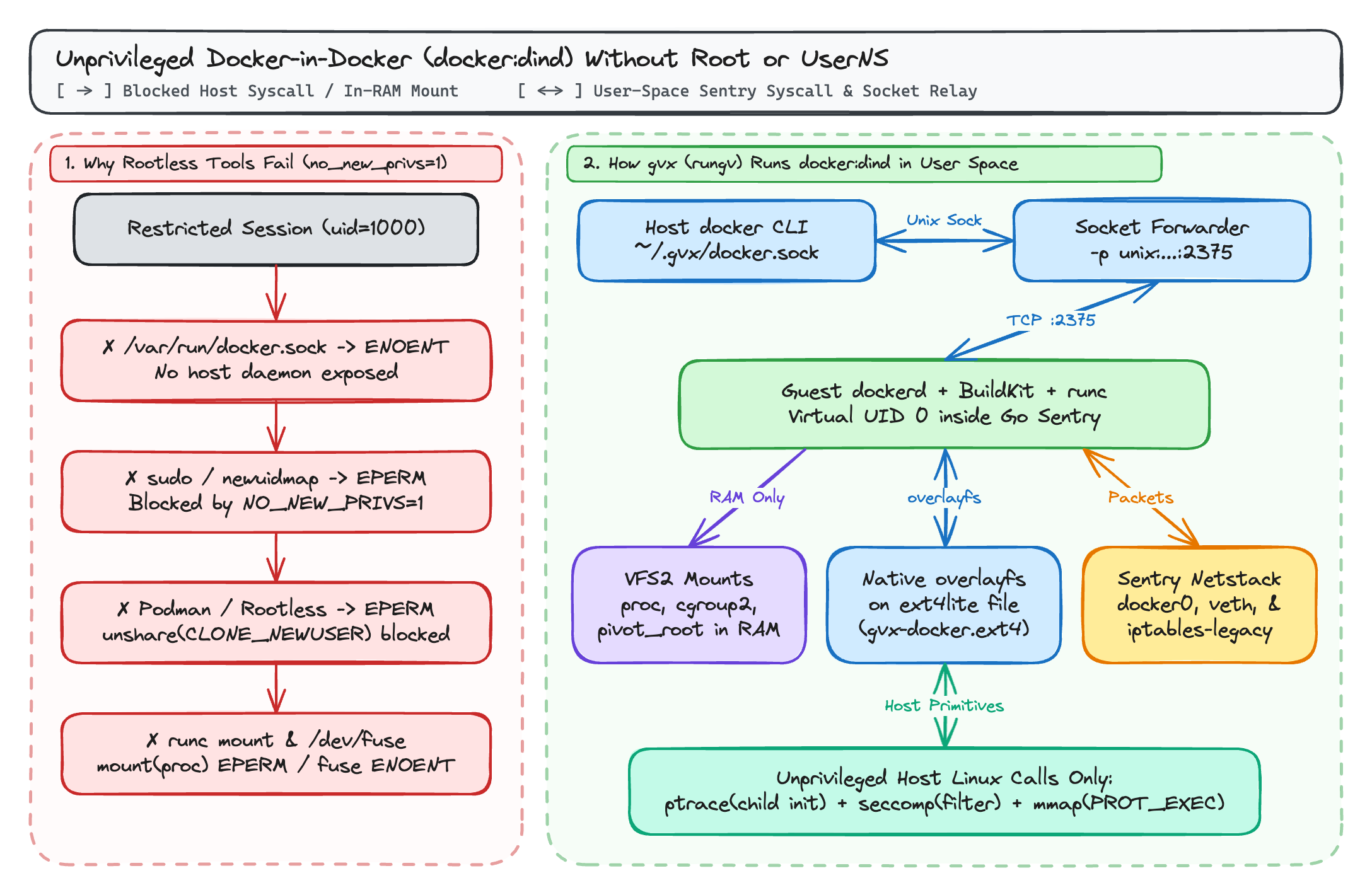
1. In-Memory Namespaces and Mount Table (VFS2)
When dockerd, containerd, and runc execute inside rungv, systrap intercepts their system calls and routes them to the in-process Sentry kernel rather than the host kernel:
unshare(2),clone(2),pivot_root(2),chroot(2), andmount(2)operate on the Sentry's in-memory task hierarchy andVFS2mount table (procfs,sysfs,tmpfs,devpts,cgroupfsv2) while the hostrungvprocess runs under your unprivileged host UID.
2. Native overlayfs on Single-File ext4lite Volumes
When you pass -v gvx-docker:/var/lib/docker (or --mount type=volume,src=/disk/gvx-docker.ext4,dst=/var/lib/docker), gvx mounts its built-in ext4lite filesystem at /var/lib/docker.
Because ext4lite implements a JBD2-journaled ext4 filesystem inside a single host file (gvx-docker.ext4) with support for trusted.overlay.* extended attributes, character whiteout devices (0:0), d_type, and RENAME_EXCHANGE, dockerd uses its native overlayfs storage driver inside the guest. Multi-stage docker build operations share Copy-on-Write layers without /dev/fuse and without the disk-space explosion of Docker's vfs fallback driver.
3. User-Space docker0 Bridge and iptables-legacy
When docker:dind starts inside gvx:
- Guest
dockerdcreates thedocker0bridge (172.17.0.1/16), attaches virtualvethpairs for nested containers, and programsNAT(DOCKER,POSTROUTING) andFILTERchains withaddrtypeandconntrackmatches insidegvx's user-spacenetstack. - Passing
-p unix:~/.gvx/docker.sock:2375binds a host Unix domain socket (mode0600) and forwards connections directly to port2375ofdockerdinside the sandbox.
Comparison with Existing Container Tools
| Capability / Constraint | Standard Docker (dockerd) | Rootless Docker / Podman | Kaniko / Buildah (Unprivileged) | gvx (rungv + docker:dind) |
|---|---|---|---|---|
Host root or sudo required | Yes | No | No | No |
Works with PR_SET_NO_NEW_PRIVS=1 | No | No (newuidmap fails) | Partial | Yes |
Works when unshare(CLONE_NEWUSER) is blocked (EPERM) | N/A | No | Buildah: No / Kaniko: Yes | Yes |
Works without /dev/fuse | Yes (uses kernel overlay2) | Only via slow vfs copy | Yes | Yes (overlayfs on ext4lite) |
Supports docker build (BuildKit) | Yes | Yes (if userns allowed) | Image build only (no runtime) | Yes |
Supports docker run and docker compose up | Yes | Yes (if userns allowed) | No | Yes |
| Runs on Windows and macOS without a Linux VM | No (requires WSL2 / VM) | No (requires Linux VM) | No | Yes (whpx, hvf, systrap) |
Exact Host Kernel Requirements on Linux
gvx requires zero elevated capabilities (CapEff: 0000000000000000) and zero user namespaces. On a Linux host, rungv relies on only three standard unprivileged kernel primitives:
ptrace(PTRACE_ATTACH)on its own child thread once during initialization:systrapspawns a local stub helper thread at startup, attaches to it to initialize the shared-memory context, and detaches. If the host setskernel.yama.ptrace_scope = 3(which disables allptracesystem-wide) or blocksptracein an outer seccomp filter,systrapinitialization cannot complete. (Underyama.ptrace_scope = 1, the default on Ubuntu and Debian,gvxsucceeds because parent-to-child tracing is permitted.)seccomp(SECCOMP_SET_MODE_FILTER): Used to trap guest system calls from container stub threads. As covered in Part 3 of this series,gvxworks both whenSECCOMP_FILTER_FLAG_NEW_LISTENERis available and when it returnsEBUSYinside a nested sandbox.mmap(..., PROT_EXEC, ...): Used to map guest ELF segments and thesystrapshared-memory trampoline.
End-to-End Example: Building and Testing a Multi-Container App Without Root
The following script runs a complete docker build and two-container integration test (redis + application container) inside an unprivileged user session:
 1mkdir -p ~/.gvx
 2rungv run \
 3  -p unix:~/.gvx/docker.sock:2375 \
 4  -v gvx-docker:/var/lib/docker \
 5  -e DOCKER_TLS_CERTDIR= \
 6  docker:dind --tls=false &
 7DIND_PID=$!
 8
 9export DOCKER_HOST="unix://$HOME/.gvx/docker.sock"
10until docker info >/dev/null 2>&1; do sleep 0.5; done
11
12mkdir -p /tmp/demo-app && cd /tmp/demo-app
13cat <<'EOF' > Dockerfile
14FROM alpine:3.20
15RUN apk add --no-cache redis
16CMD ["redis-cli", "-h", "cache", "ping"]
17EOF
18
19# Build the image using overlayfs on ext4lite
20docker build -t demo-ping:latest .
21
22# Create a bridge network, start Redis, and verify connectivity between containers
23docker network create demo-net
24docker run -d --name cache --network demo-net redis:7-alpine
25docker run --rm --network demo-net demo-ping:latest
26# Output: PONG
27
28# Clean up workload containers and stop the sandbox
29docker rm -f cache
30docker network rm demo-net
31kill -INT $DIND_PID
Further Reading in This Series
- gvx: Running Linux Containers, Docker, and Kubernetes in One Unprivileged Process: Architectural overview of
gvx, its cross-platform execution engines (whpx,hvf,systrap),VFS2(erofs,ext4lite,hostfsv2), andnetstack. - Running Docker, docker build, and docker compose Without Root or User Namespaces (this post)
- Running Docker-in-Docker Inside gVisor and Nested Sandboxes with gvx: How
gvxsolvesmodprobe,iptables-nft,overlay2ongofer, and nestedSECCOMP_FILTER_FLAG_NEW_LISTENER(EBUSY) insidegVisor(runsc). - Fast Isolated Docker Environments for AI Agent RL Rollouts with gvx: Scaling parallel
SWE-benchand RL rollout environments with 100-millisecond copy-on-write.ext4volume resets.