 GoSuda
gvx: Running Linux Containers, Docker, and Kubernetes in One Unprivileged Process

Introduction: Security-Hardened Containers Without Root or Host Daemons
Running Linux containers, docker build, or Kubernetes inside a development machine, CI runner, or multi-tenant cloud node usually forces an uncomfortable security trade-off:
- On Linux, standard OCI runtimes (
runc,crun,runsc) require eitherrootprivileges, host/var/run/docker.sockexposure,--privileged(CAP_SYS_ADMIN), or user namespaces (unshare(CLONE_NEWUSER)) that expand the host kernel attack surface. - On Windows and macOS, container engines (
Docker Desktop,Podman Machine,Lima,OrbStack) boot a full Linux virtual machine kernel inside WSL2, Hyper-V, orVirtualization.frameworkand run a persistent background daemon inside that VM.
gvx (rungv CLI and the z.gfire.dev/gvx/pkg/gvx Go SDK) provides a secure, zero-privilege alternative. Built as an upstream-trackable fork of Google's gVisor user-space Linux kernel (Sentry) and user-space network stack (netstack), gvx executes unmodified linux/amd64 and linux/arm64 ELF64 binaries and OCI containers directly inside a single unprivileged, self-locked host process on Windows, macOS, and Linux.
Security Guarantee (Three-Ring Defense-in-Depth):
gvxnever weakens host OS security boundaries, never installs kernel drivers, and never requiresroot,sudo,--privilegedon the host, orCLONE_NEWUSER. Before executing a single guest instruction,gvxlocks down its own host process using Windows Restricted Tokens and Job Objects, macOS Seatbelt (deny default), or LinuxPR_SET_NO_NEW_PRIVS+ BPFseccomp. All guest system calls, virtualUID 0privileges, mounts (VFS2), and network tables (netstack) are strictly confined inside the memory-safe GoSentrykernel.
| Runtime | Host OS | Cold Start | Memory Footprint | Admin or sudo Needed | Background VM Daemon | Direct OCI Image Run |
|---|---|---|---|---|---|---|
gvx (whpx / hvf) | Windows (amd64, arm64) & macOS (arm64) | ~20 ms | ~30 MiB | No | No | Yes |
gvx (systrap) | Windows (amd64, arm64) & Linux (amd64, arm64) | ~25 to 65 ms | ~31 MiB | No | No | Yes |
| WSL2 / Docker Desktop | Windows & macOS | 800 to 2500 ms | > 512 MiB | Yes (Initial Setup) | Yes | Requires Daemon |
| QEMU (Full System) | Windows & macOS | 1500 to 4000 ms | > 256 MiB | No | No | Requires Disk Image |
No Linux VM kernel boots on Windows or macOS. No background daemon runs on the host. No root, sudo, user namespaces (CLONE_NEWUSER), mount(2), TUN/TAP drivers, or CAP_NET_ADMIN privileges are required on the host OS. Inside that unprivileged process, gvx runs Docker-in-Docker (docker:dind), docker build, docker compose, and multi-node High-Availability Kubernetes (k3s with embedded etcd and Calico CNI).
Container Lifecycle and Three-Ring Host Lockdown
Every gvx sandbox runs inside one unprivileged host process and enforces a three-phase lifecycle: pre-opening all required host file descriptors and sockets, locking down the host OS process via pkg/hostlockdown, and entering the in-process Sentry execution loop.
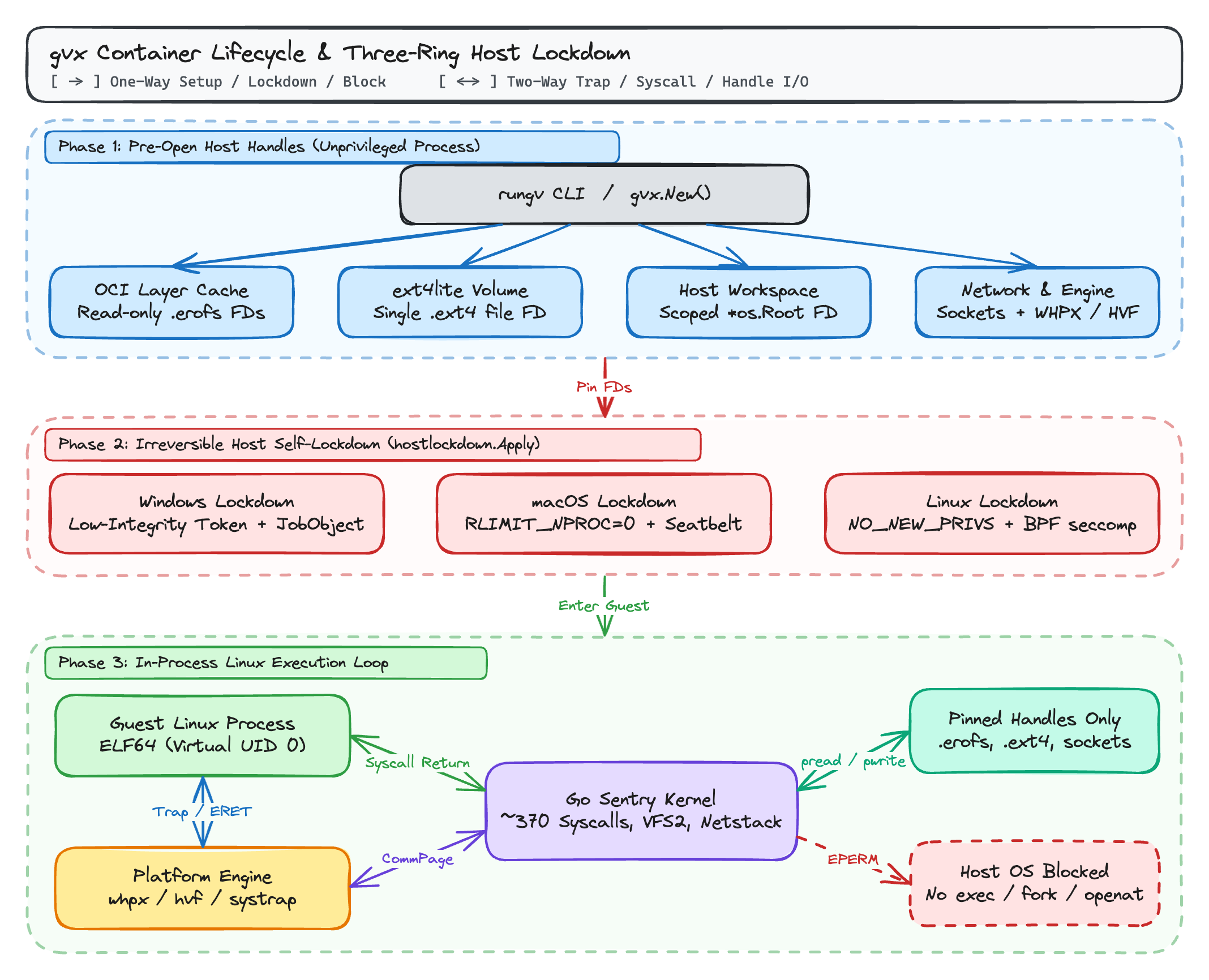
Before transferring control to the first guest instruction, gvx pre-opens its cached .erofs image layer descriptors, .ext4 volume file descriptors, /workspace *os.Root handle, and host network sockets, then invokes hostlockdown.Apply():
- Windows NT (
lockdown_windows.go): CallsAdjustTokenPrivilegeswithSE_PRIVILEGE_REMOVEDto strip privileges in-place, binds aDISABLE_MAX_PRIVILEGErestricted impersonation token at Low integrity (S-1-16-4096), assigns the process to an anonymous Job Object withJOB_OBJECT_LIMIT_ACTIVE_PROCESS = 1(blocking any child process creation), and enablesDisallowWin32kSystemCalls = 1viaSetProcessMitigationPolicy. - macOS XNU (
lockdown_darwin.go): SetsRLIMIT_NPROC = 0and applies a Seatbelt profile (sandbox_init_with_parameters) starting from(version 1)(deny default)that blocksprocess-fork,process-exec*, and all new host file opens. - Linux (
lockdown_linux.go+pkg/gvx/syscallfilter_linux.go): SetsPR_SET_NO_NEW_PRIVSand installs the Sentry BPFseccompallowlist across all threads (SECCOMP_FILTER_FLAG_TSYNC) with explicitEPERMrules forexecve,execveat,clone,openat, andsocket.
Cross-Platform Syscall Interception and 4 KB Paging (pkg/sentry/platform)
Linux ELF64 binaries assume 4 KB (0x1000) memory page granularity for mmap(MAP_FIXED) segment mappings. However, Windows VirtualAlloc and MapViewOfFile3 enforce 64 KB (0x10000) alignment, and Apple Silicon macOS (darwin/arm64) uses 16 KB (0x4000) host pages. Furthermore, each OS requires a different mechanism to intercept Linux SYSCALL (amd64) and SVC #0 (arm64) instructions without booting a Linux VM.
gvx solves both problems across four execution backends that implement pkg/sentry/platform.Context:
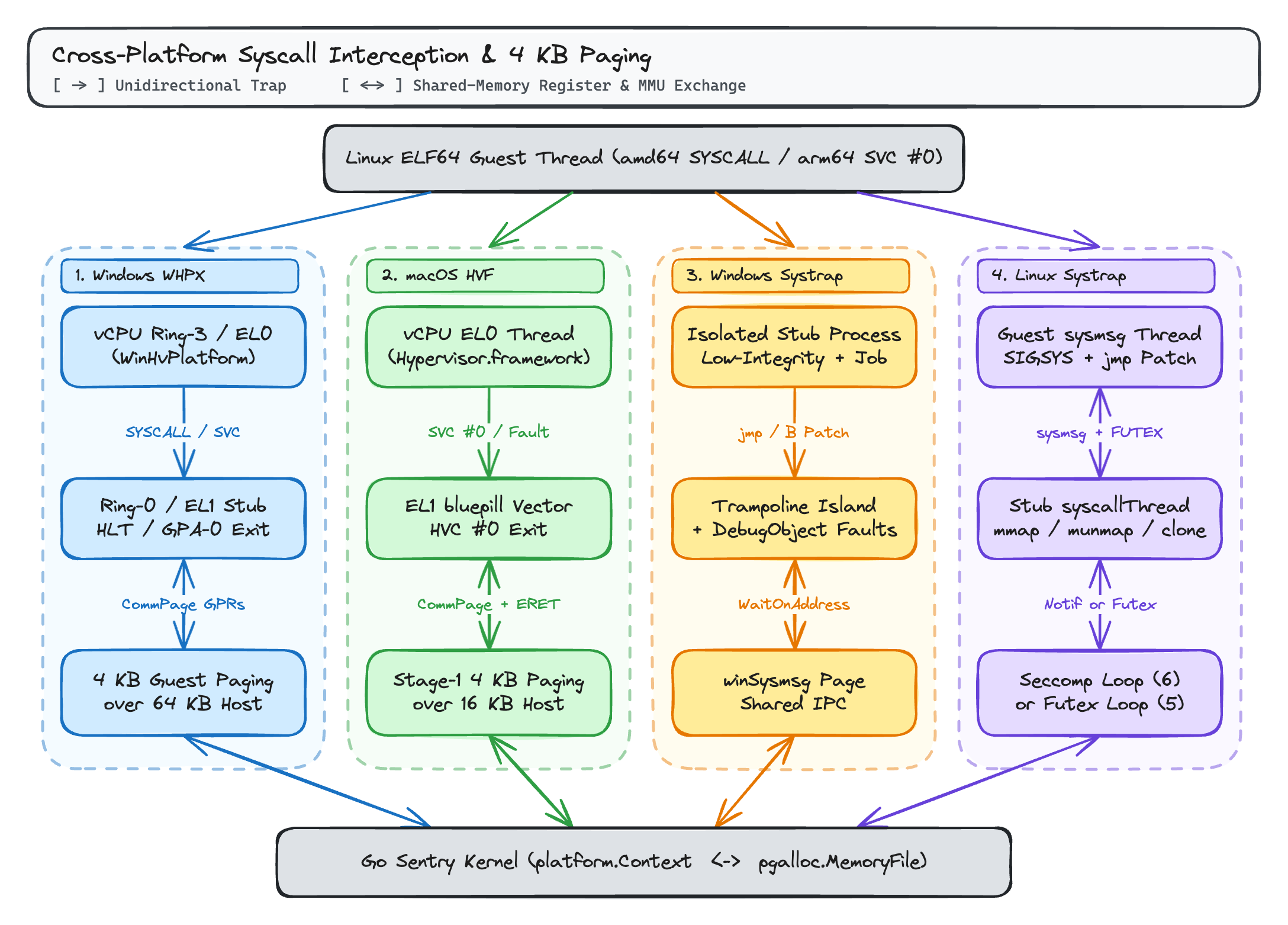
1. Windows Hardware Engine: platform/whpx (WinHvPlatform.dll)
On windows/amd64 and windows/arm64, platform/whpx creates a lightweight hypervisor partition via WHvCreatePartition without booting a guest OS kernel:
- 64 KB-to-4 KB Paging Decoupler:
whpxregisters each 64 MiB arena ofpgalloc.MemoryFilewith the partition once throughWHvMapGpaRange. SubsequentMapFileandUnmapcalls modify only the in-partition guest page tables, enforcing exact 4 KBR/W/Xpermissions despite Windows' 64 KB allocation granularity. - Zero-API Register Exchange via
CommPage:- On
amd64, guest Ring-3SYSCALLenters an in-partition Ring-0MSR_LSTARstub (stubgen_x86.go), which spills the fast-path syscall GPRs (RAX, RDI, RSI, RDX, R10, R8, R9, RIP, RSP) into a shared 4 KBCommPageand executesHLTto exitWHvRunVirtualProcessor. - On
arm64, guest EL0SVC #0enters EL1 vectors (stubgen_a64.go), spillsX0..X8, SP_EL0, ELR_EL1, PSTATEintoCommPage, and loads from unbacked GPA zero to trigger a memory exit back to the Sentry.
- On
2. macOS Hardware Engine: platform/hvf (Hypervisor.framework)
On Apple Silicon (darwin/arm64), platform/hvf runs container threads inside Hypervisor.framework vCPUs (hv_vm_create, hv_vcpu_run):
- Two-Stage 4 KB over 16 KB MMU Translation: Stage-2 (
hv_vm_map) maps 1 GiB memory-file chunks into Intermediate Physical Address (IPA) space once at 16 KB host page granularity withHV_MEMORY_READ | HV_MEMORY_WRITE | HV_MEMORY_EXEC. Inside the vCPU, the EL1bluepillstub (bluepill_arm64.go) configuresTCR_EL1.TG0 = 0b00(4 KB granule) inTTBR0_EL1and populates 4 KB Stage-1 page table entries with exactR-XorRW-(UXN=1) permissions. Because the ARM64 MMU enforces the intersection of Stage-1 and Stage-2 permissions, the hardware traps permission faults at exact 4 KB boundaries. - Syscall Trap: Guest EL0
SVC #0traps to EL1VBAR_EL1, spills registers to the shared 4 KBCommPage, and executesHVC #0to return fromhv_vcpu_runto the Go Sentry thread.
3. Windows User-Mode Fallback: platform/systrap (winsystrap)
When hardware virtualization is unavailable (such as inside nested cloud VMs), winsystrap runs guest code in user mode on windows/amd64 and windows/arm64:
- Hardware
CR3/TTBR0_EL1Isolation: Guest threads run inside isolated stub subprocesses booted from a generated 1 KB executable (stubimage_xplat.go) confined by a Low-Integrity token and a Job Object. - In-Place Binary Patching &
winSysmsgIPC: Onamd64, the patcher (patcher_amd64_xplat.go) replaces 2-bytesyscall(0f 05) instructions with 5-bytejmp rel32jumps (orCC 90breakpoint traps when a 5-byte window is unavailable) into a fast-path island. Onarm64,svc #0is patched with aBbranch to an island slot. The island spills registers to the sharedwinSysmsgpage and synchronizes with the Sentry viaWaitOnAddressandWakeByAddressSingle, while unpatched traps and page faults stop on a Windows Debug Object (WaitForDebugEventEx).
4. Linux User-Mode Engine: platform/systrap
On linux/amd64 and linux/arm64, systrap runs guest threads (sysmsg) that trap guest syscalls via SECCOMP_RET_TRAP (SIGSYS) and binary-patch syscall sites into a shared-memory trampoline (sysmsg) synchronized via SYS_FUTEX, while a stub syscallThread (syscall_thread.go) executes address-space operations (mmap, munmap, clone) via SECCOMP_RET_USER_NOTIF (_RUN_SECCOMP_LOOP). When gvx runs inside an outer gVisor (runsc) sandbox where the single SECCOMP_FILTER_FLAG_NEW_LISTENER slot returns EBUSY, gvx automatically switches syscallThread to a shared-memory futex loop (_RUN_SYSCALL_LOOP), as detailed in Part 3 of this series.
How gvx Maps Guest Linux System Calls to Virtual Subsystems and Host Handles
Once a platform engine traps a guest SYSCALL (amd64) or SVC #0 (arm64) instruction and writes the guest registers into the 4 KB shared page (CommPage, sysmsg, or winSysmsg), control returns to the Go Sentry task goroutine (pkg/sentry/kernel/task_syscall.go). Rather than forwarding Linux system calls to the underlying host OS kernel, Task.doSyscall() saves the original register state (SyscallSaveOrig()), evaluates any in-guest BPF seccomp filters and ptrace stops, and dispatches the system call number through linux.AMD64 or linux.ARM64 (pkg/sentry/syscalls/linux/linux64.go, covering ~370 Linux system calls) into four internal domains:
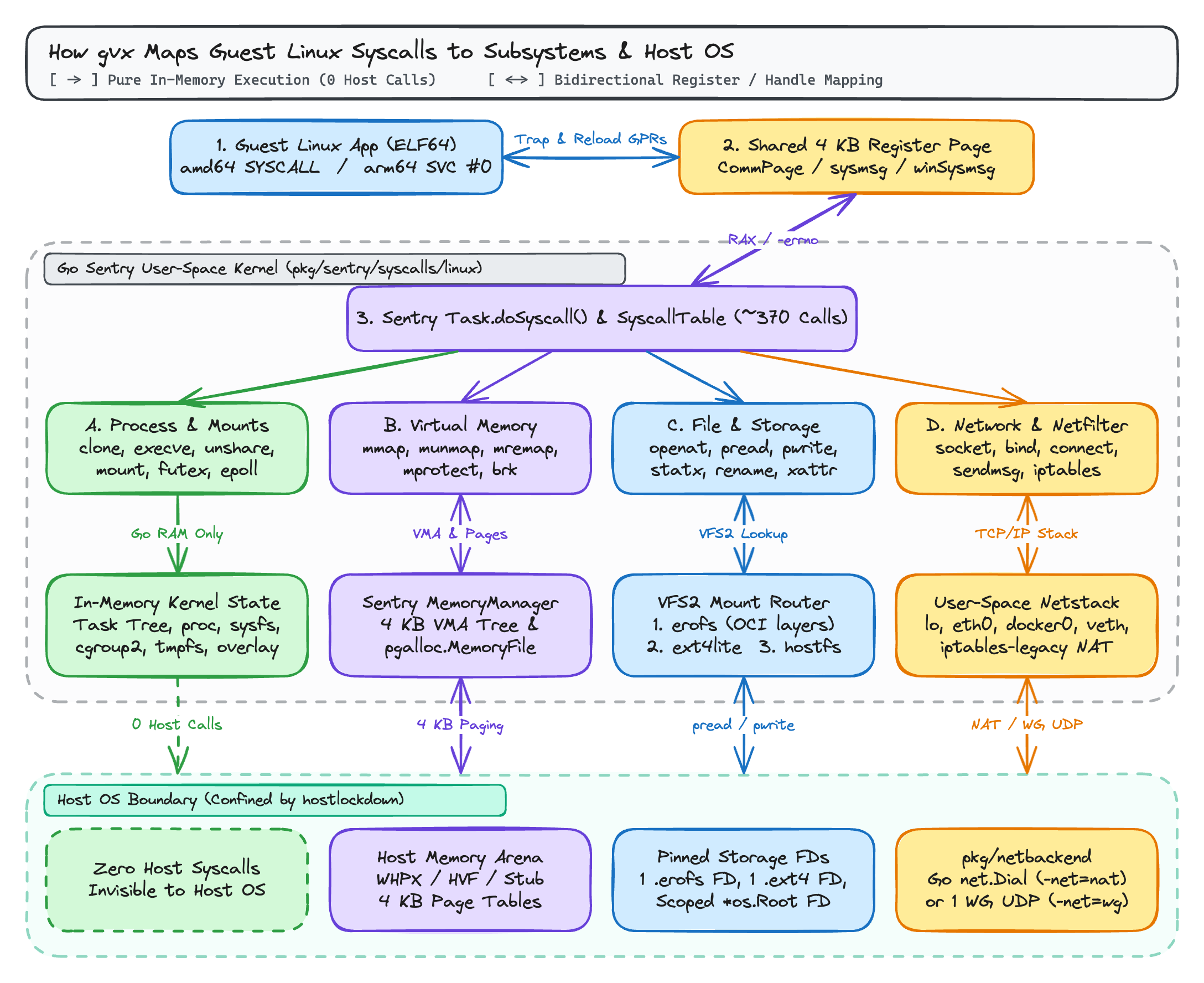
| Syscall Domain | Representative Guest Linux Syscalls | Internal gvx Subsystem (pkg/sentry) | Host OS Boundary Interaction (After hostlockdown) |
|---|---|---|---|
| A. Process, Namespace, Mount & Sync | clone, execve, unshare, setns, mount, umount2, pivot_root, setuid, capset, futex, epoll_wait, pipe2 | kernel.Task, virtual credentials, futex table, and in-memory VFS2 (procfs, sysfs, cgroupfs v2, tmpfs, overlayfs) | Zero host syscalls (100% in-memory Go state; completely invisible to the host OS) |
B. Virtual Memory (MM) | mmap, munmap, mremap, mprotect, brk, madvise, memfd_create | mm.MemoryManager (4 KB VMA tree) & pgalloc.MemoryFile | Bidirectional 4 KB page-table updates via WHvMapGpaRange, hv_vm_map + TTBR0_EL1, or stub mmap/mprotect |
C. File & Storage (VFS2) | openat, pread64, pwrite64, getdents64, statx, renameat2, setxattr, mknod, inotify_add_watch | vfs.VirtualFilesystem mount table router (fsimpl/erofs, fsimpl/ext4lite, fsimpl/hostfs v2) | Bidirectional pread/pwrite on 1 pinned .erofs FD or 1 .ext4 FD, or scoped relative walks on *os.Root |
| D. Networking & Netfilter | socket, bind, listen, connect, sendmsg, recvmsg, netlink, setsockopt(IPT_SO_SET_REPLACE) | User-space pkg/tcpip (lo, eth0, docker0, veth, vxlan, wireguard, ipset, iptables-legacy) | Intra-sandbox traffic uses zero host syscalls; external traffic maps to net.Dial/net.Listen (-net=nat) or 1 UDP socket (-net=wg) |
When the handler returns (rval, ctrl, err), Task.doSyscallInvoke() converts any error into a negative Linux errno (-ExtractErrno(err, sysno)), writes the return value back to the shared register page (RAX on amd64, X0 on arm64), and resumes guest execution.
Storage (VFS2) and Dual-Track User-Space Networking (netstack)
All guest file and network operations are serviced inside the Go Sentry through three VFS2 filesystems and two pkg/netbackend tracks:
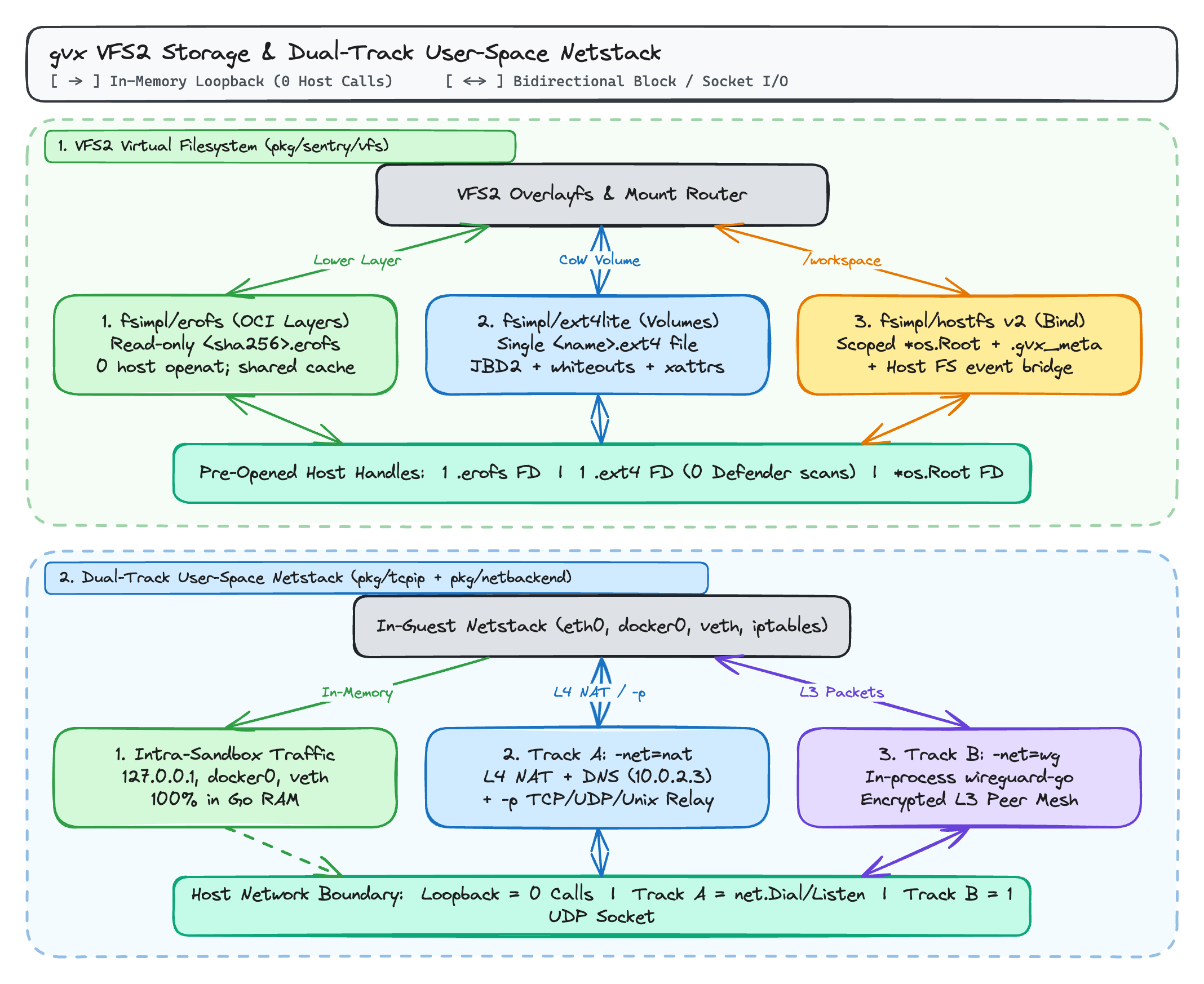
| Storage Engine | Mount Role in gvx | Backing Host Resource | Host openat / NtCreateFile Calls at Run Time | Windows Defender (WdFilter.sys) Per-File Scans |
|---|---|---|---|---|
fsimpl/erofs | Read-only OCI image lower layers | Single <sha256>.erofs file per layer | 0 | 0 |
fsimpl/ext4lite | Named volumes (-v name:/path) | Single <name>.ext4 file per volume | 0 | 0 |
fsimpl/hostfs v2 | Host workspace (-workspace, -v /host:/guest) | Pinned *os.Root host directory | O(depth) per uncached open | 1 per host file close |
Why ext4lite Matters for Docker, Databases, and Package Managers
Extracting or writing tens of thousands of container files directly onto Windows NTFS or macOS APFS triggers antivirus minifilter scans (WdFilter.sys), case-sensitivity collisions, and missing POSIX extended attributes.
pkg/sentry/fsimpl/ext4lite implements a pure-Go ext4 filesystem inside one pre-opened host file (%LOCALAPPDATA%\gvx\cache\volumes\<name>.ext4 on Windows, ~/Library/Caches/gvx/volumes/<name>.ext4 on macOS, or ~/.cache/gvx/volumes/<name>.ext4 on Linux) with:
- 4 KiB blocks and 16 MiB dynamic block groups (
meta_bg): Grows dynamically without sparse-file allocation stalls (fallocateon Linux,fcntl(F_PREALLOCATE)on macOS,FileAllocationInfoon Windows) and compacts unused trailing groups on clean unmount. - JBD2 ordered-mode journal (inode 8): Atomic transaction commits with CRC-32 checksums and revoke blocks, plus
fsckLiterecovery. overlayfsupper-layer support: Implementstrusted.overlay.*andsecurity.capabilityextended attributes, character device whiteouts (0:0),d_typedirectory entry reporting, andRENAME_EXCHANGE.
Practical Workloads: Docker Engine, Kubernetes (k3s + Calico), and Go SDK
Installing rungv: SLSA-Attested Prebuilt Releases or go install
You can download a prebuilt rungv archive for linux/amd64, linux/arm64, darwin/arm64, windows/amd64, or windows/arm64 from GitHub Releases (each built by the SLSA release pipeline with a Sigstore provenance bundle and SHA256SUMS), or install directly from source with go install:
1# Option A: Download a prebuilt release and verify SLSA build provenance
2gh attestation verify rungv-v0.2.0-linux-amd64.tar.gz --repo gfire-sigs/gvx \
3  --signer-workflow gfire-sigs/gvx/.github/workflows/release.yml \
4  --source-ref refs/tags/v0.2.0 --deny-self-hosted-runners
5shasum -a 256 -c SHA256SUMS --ignore-missing
6tar -xzf rungv-v0.2.0-linux-amd64.tar.gz
7
8# Option B: Install directly via Go (Linux / Windows)
9CGO_ENABLED=0 go install z.gfire.dev/gvx/cmd/rungv@latest
On macOS (
darwin/arm64), the prebuilt release archive is already signed with thecom.apple.security.hypervisorentitlement (xattr -d com.apple.quarantine rungvclears browser quarantine). If you build locally withgo installorgo buildon macOS, sign the binary withcodesign --sign - --entitlements entitlements.plist --force $(which rungv).
1. Running an Unprivileged Docker Engine (docker:dind)
Following docs/docker-engine.md, you can run an unmodified docker:dind container inside rungv on Windows, macOS, or Linux and control it with your host docker CLI:
 1# 1. Create the host directory for the forwarded Unix socket
 2mkdir -p ~/.gvx
 3
 4# 2. Start docker:dind inside a gvx sandbox with an ext4lite volume
 5rungv run \
 6  -p unix:~/.gvx/docker.sock:2375 \
 7  -p 127.0.0.1:9000-9019:9000-9019 \
 8  -v gvx-docker:/var/lib/docker \
 9  -e DOCKER_TLS_CERTDIR= \
10  docker:dind --tls=false
In a second terminal, point your host docker CLI at the sandbox socket:
1docker context create gvx --docker host=unix://$HOME/.gvx/docker.sock
2docker context use gvx
3
4docker info --format '{{.Driver}} {{.OperatingSystem}}'
5# Output: overlayfs Alpine Linux ... (containerized)
6
7docker build -t myapp ./app
8docker compose up -d
2. Running Kubernetes (k3s + Calico) in Unprivileged Sandboxes
Because gvx implements /dev/kmsg, cgroup v2 (memory.max OOM killer and cpu.max bandwidth throttling), /proc/diskstats, wireguard and vxlan netlink devices, ipset, and iptables-legacy (addrtype, conntrack, statistic, recent), an unmodified rancher/k3s image reaches Ready inside a single rungv process:
 1mkdir -p ~/.gvx/k3s
 2
 3rungv run \
 4  -e IPTABLES_MODE=legacy \
 5  -p 127.0.0.1:6443:6443 \
 6  -p 127.0.0.1:30000-30019:30000-30019 \
 7  -v k3s:/var/lib/rancher \
 8  --mount type=bind,src=$HOME/.gvx/k3s,dst=/output \
 9  rancher/k3s:v1.31.4-k3s1 server \
10  --disable=traefik,servicelb \
11  --write-kubeconfig=/output/kubeconfig.yaml \
12  --write-kubeconfig-mode=644
You can also join multiple gvx nodes over WireGuard (flannel-backend=wireguard-native or a wg0 mesh) with embedded etcd high availability, or run Calico (calico-vxlan.yaml with FELIX_IPTABLESBACKEND=Legacy) to enforce Kubernetes NetworkPolicy completely inside user space.
3. Embedding Linux Containers in Go via z.gfire.dev/gvx/pkg/gvx
Go applications can embed Linux containers directly without an external container daemon:
 1package main
 2
 3import (
 4	"context"
 5	"fmt"
 6	"os"
 7
 8	"z.gfire.dev/gvx/pkg/gvx"
 9)
10
11func main() {
12	ctx := context.Background()
13	sb, err := gvx.New(ctx, gvx.Config{
14		Platform:      gvx.PlatformAuto,
15		NetworkMode:   gvx.NetModeNAT,
16		OCIImage:      "alpine:3.20",
17		WorkspacePath: "./repo",
18		Argv:          []string{"/usr/bin/git", "status"},
19		Stdout:        os.Stdout,
20		Stderr:        os.Stderr,
21	})
22	if err != nil {
23		fmt.Fprintf(os.Stderr, "init sandbox: %v\n", err)
24		os.Exit(1)
25	}
26	defer sb.Close()
27
28	exitCode, err := sb.Run(ctx)
29	if err != nil {
30		fmt.Fprintf(os.Stderr, "run sandbox: %v\n", err)
31		os.Exit(1)
32	}
33	os.Exit(exitCode)
34}
Further Reading in This Series
- gvx: Running Linux Containers, Docker, and Kubernetes in One Unprivileged Process (this post)
- Running Docker, docker build, and docker compose Without Root or User Namespaces: How to bootstrap
docker:dindin locked-down sandboxes wheresudo,unshare(CLONE_NEWUSER),mount(2), and/dev/fuseare blocked. - Running Docker-in-Docker Inside gVisor and Nested Sandboxes with gvx: Why
apt-get install docker.ioand nestedrunscfail insidegVisoracross five kernel barriers, and howgvxruns nesteddocker:dindusing a shared-memory futex loop. - Fast Isolated Docker Environments for AI Agent RL Rollouts with gvx: Scaling
SWE-benchand agent reinforcement learning rollouts with hundreds of parallel unprivilegeddocker:dindinstances and 100-millisecond copy-on-write.ext4volume resets.